Text Alignment
Text alignment is used for pairwise comparison of texts (e.g. books), with the aim of checking for deletions, insertions, matches and mismatches in the target texts relative to a reference texts. This is the same task as sequence alignment of two DNA sequence as in Biology. Indeed, Yunir.jl supports this by extending the BioAlignments.jl APIs to sequence of Arabic texts. Yunir.jl uses align function for aligning two texts.
How it works
The way it works is that, BioAlignments.jl requires a Roman characters as input for pairwise alignment. Therefore, any Arabic characters must first be transliterated to Roman characters. This is possible using Yunir.jl's encode function. The resulting alignment, which is in Roman characters, is then transliterated back to Arabic for easy interpretation.
KITAB project's text reuse
We will consider a simple example based on "text reuse" case study of KITAB project. The following are portions of two books with IDs Shamela0012129-ara1 and Shamela0023790-ara1 which was detected by "passim" (the tool used by KITAB project) as similar. The goal is to compare the two input texts by aligning the characters, and see the similarity based on matches, mismatches, deletions and insertions of characters. In the example texts below, we'll confirm the matches and see how Yunir.jl's APIs work on text alignment.
| Shamela0012129-ara1 | Shamela0023790-ara1 |
|---|---|
| خرج مع ابي بكر الصديق رضي الله عنه في تجارة الي بصري ومعهم نعيمان وكان نعيمان ممن شهد——- بدرا ايضا وك——-ان علي الزاد فقال له سويبط———– اطعمني فقال حتي يجء ابو بكر فقال اما والله لاغيظنك فمروا بقوم فقال لهم سويبط -تشترون مني عبدا قا—لوا نعم فقال انه عبد له كلام وهو قاءل لكم اني حر فان كنتم اذا قال لكم هذه المقالة تركتموه فلا تفسدوا علي عبدي قا-لوا بل نشتريه منك فاشتروه بعشر قلاءص ثم جاءوا فوضعوا في عنقه حبلا ف—————قال نعيمان ان هذا يستهزء بكم واني حر فقالوا قد عرفنا –خبرك وانطلقوا به فلما جاء ابو بكر -اخبروه فاتبعهم ورد عليهم القلاءص واخذه فلما قدموا علي النبي صلي الله عليه وسلم اخبروه فضحك هو واصحابه من ذلك حولا | خرج— ابو بكر——————– في تجارة——— ومعه- نعيمان وسويبط بن حرملة وكانا شهدا بدر—–ا وكان نعيمان علي الزاد فقال له سويبط وكان مزاحا اطعمني فقال حتي يجء ابو بكر فقال اما والله لاغيظنك فمروا بقوم فقال لهم سويبط اتشترون مني عبدا لي قالوا نعم ق-ال انه عبد له كلام وهو قاءل لكم اني حر فان كنتم اذا قال لكم هذه المقالة تركتموه فلا تفسدوا علي عبدي فقالوا بل نشتريه منك——– بعشر قلاءص ثم جاءوا فوضعوا في عنقه حبلا وعمامة واشتروه فقال نعيمان ان هذا يستهزء بكم واني حر قا-لوا قد اخبرنا بخبرك وانطلقوا به و—-جاء ابو بكر فاخبروه فاتبعهم فرد عليهم القلاءص واخذه فلما قدموا علي النبي صلي الله عليه وسلم اخبروه فضحك هو واصحابه منهما- حول |
Data processing
To have a quality output, we will need to process the texts to remove unnecessary noise. First, we need to remove all non-Arabic characters. To start with, the following will input the two candidate texts:
julia> using Yunirjulia> @transliterator :defaultjulia> shamela0012129 = Ar("خرج مع ابي بكر الصديق رضي الله عنه في تجارة الي بصري ومعهم نعيمان وكان نعيمان ممن شهد——- بدرا ايضا وك——-ان علي الزاد فقال له سويبط———– اطعمني فقال حتي يجء ابو بكر فقال اما والله لاغيظنك فمروا بقوم فقال لهم سويبط -تشترون مني عبدا قا—لوا نعم فقال انه عبد له كلام وهو قاءل لكم اني حر فان كنتم اذا قال لكم هذه المقالة تركتموه فلا تفسدوا علي عبدي قا-لوا بل نشتريه منك فاشتروه بعشر قلاءص ثم جاءوا فوضعوا في عنقه حبلا ف—————قال نعيمان ان هذا يستهزء بكم واني حر فقالوا قد عرفنا –خبرك وانطلقوا به فلما جاء ابو بكر -اخبروه فاتبعهم ورد عليهم القلاءص واخذه فلما قدموا علي النبي صلي الله عليه وسلم اخبروه فضحك هو واصحابه من ذلك حولا");julia> shamela0023790 = Ar("خرج— ابو بكر——————– في تجارة——— ومعه- نعيمان وسويبط بن حرملة وكانا شهدا بدر—–ا وكان نعيمان علي الزاد فقال له سويبط وكان مزاحا اطعمني فقال حتي يجء ابو بكر فقال اما والله لاغيظنك فمروا بقوم فقال لهم سويبط اتشترون مني عبدا لي قالوا نعم ق-ال انه عبد له كلام وهو قاءل لكم اني حر فان كنتم اذا قال لكم هذه المقالة تركتموه فلا تفسدوا علي عبدي فقالوا بل نشتريه منك——– بعشر قلاءص ثم جاءوا فوضعوا في عنقه حبلا وعمامة واشتروه فقال نعيمان ان هذا يستهزء بكم واني حر قا-لوا قد اخبرنا بخبرك وانطلقوا به و—-جاء ابو بكر فاخبروه فاتبعهم فرد عليهم القلاءص واخذه فلما قدموا علي النبي صلي الله عليه وسلم اخبروه فضحك هو واصحابه منهما- حول");
Next, we remove the non-Arabic characters like the dashes using the clean function:
julia> shamela0012129_cln = clean(shamela0012129)Ar("خرج مع ابي بكر الصديق رضي الله عنه في تجارة الي بصري ومعهم نعيمان وكان نعيمان ممن شهد بدرا ايضا وكان علي الزاد فقال له سويبط اطعمني فقال حتي يجء ابو بكر فقال اما والله لاغيظنك فمروا بقوم فقال لهم سويبط تشترون مني عبدا قالوا نعم فقال انه عبد له كلام وهو قاءل لكم اني حر فان كنتم اذا قال لكم هذه المقالة تركتموه فلا تفسدوا علي عبدي قالوا بل نشتريه منك فاشتروه بعشر قلاءص ثم جاءوا فوضعوا في عنقه حبلا فقال نعيمان ان هذا يستهزء بكم واني حر فقالوا قد عرفنا خبرك وانطلقوا به فلما جاء ابو بكر اخبروه فاتبعهم ورد عليهم القلاءص واخذه فلما قدموا علي النبي صلي الله عليه وسلم اخبروه فضحك هو واصحابه من ذلك حولا")julia> shamela0023790_cln = clean(shamela0023790)Ar("خرج ابو بكر في تجارة ومعه نعيمان وسويبط بن حرملة وكانا شهدا بدرا وكان نعيمان علي الزاد فقال له سويبط وكان مزاحا اطعمني فقال حتي يجء ابو بكر فقال اما والله لاغيظنك فمروا بقوم فقال لهم سويبط اتشترون مني عبدا لي قالوا نعم قال انه عبد له كلام وهو قاءل لكم اني حر فان كنتم اذا قال لكم هذه المقالة تركتموه فلا تفسدوا علي عبدي فقالوا بل نشتريه منك بعشر قلاءص ثم جاءوا فوضعوا في عنقه حبلا وعمامة واشتروه فقال نعيمان ان هذا يستهزء بكم واني حر قالوا قد اخبرنا بخبرك وانطلقوا به وجاء ابو بكر فاخبروه فاتبعهم فرد عليهم القلاءص واخذه فلما قدموا علي النبي صلي الله عليه وسلم اخبروه فضحك هو واصحابه منهما حول")
The clean function removes the non-Arabic characters through RegEx or Regular Expression, which is set at the third parameter of the function. That is, clean(shamela0012129) is actually equivalent to:
clean(shamela0012129; replace_non_ar="", target_regex=r"[A-Za-z0-9\(:×\|\–\[\«\»\]~\)_@./#&+\—-]*")In case there are still non-Arabic characters not captured using the default regex, simply insert it to the default pattern.
It is important that all non-Arabic characters be removed since any special character might be transliterated to a particular Arabic character once transliterating the output back to Arabic, and the result might mislead. See the section "How it works" above.
Next, we need to normalize the word Allah, الله, into a single Unicode U+FDF2. This is because this word or name consist of 4 consonants, but most software assigns this into a single Unicode when detected, and hence it is better to convert it in the first place. This is also true with Lam-Alif, ﻻ, composed of two letters but we can assign it to a single Unicode U+FEFB. To do this, we define a mapping of these characters for the normalizer and then use it to normalize the input texts.
julia> mapping = Dict( "الله" => "ﷲ", "لا" => "ﻻ" );julia> shamela0012129_nrm = normalize(shamela0012129_cln, mapping)Ar("خرج مع ابي بكر الصديق رضي ﷲ عنه في تجارة الي بصري ومعهم نعيمان وكان نعيمان ممن شهد بدرا ايضا وكان علي الزاد فقال له سويبط اطعمني فقال حتي يجء ابو بكر فقال اما وﷲ ﻻغيظنك فمروا بقوم فقال لهم سويبط تشترون مني عبدا قالوا نعم فقال انه عبد له كﻻم وهو قاءل لكم اني حر فان كنتم اذا قال لكم هذه المقالة تركتموه فﻻ تفسدوا علي عبدي قالوا بل نشتريه منك فاشتروه بعشر قﻻءص ثم جاءوا فوضعوا في عنقه حبﻻ فقال نعيمان ان هذا يستهزء بكم واني حر فقالوا قد عرفنا خبرك وانطلقوا به فلما جاء ابو بكر اخبروه فاتبعهم ورد عليهم القﻻءص واخذه فلما قدموا علي النبي صلي ﷲ عليه وسلم اخبروه فضحك هو واصحابه من ذلك حوﻻ")julia> shamela0023790_nrm = normalize(shamela0023790_cln, mapping)Ar("خرج ابو بكر في تجارة ومعه نعيمان وسويبط بن حرملة وكانا شهدا بدرا وكان نعيمان علي الزاد فقال له سويبط وكان مزاحا اطعمني فقال حتي يجء ابو بكر فقال اما وﷲ ﻻغيظنك فمروا بقوم فقال لهم سويبط اتشترون مني عبدا لي قالوا نعم قال انه عبد له كﻻم وهو قاءل لكم اني حر فان كنتم اذا قال لكم هذه المقالة تركتموه فﻻ تفسدوا علي عبدي فقالوا بل نشتريه منك بعشر قﻻءص ثم جاءوا فوضعوا في عنقه حبﻻ وعمامة واشتروه فقال نعيمان ان هذا يستهزء بكم واني حر قالوا قد اخبرنا بخبرك وانطلقوا به وجاء ابو بكر فاخبروه فاتبعهم فرد عليهم القﻻءص واخذه فلما قدموا علي النبي صلي ﷲ عليه وسلم اخبروه فضحك هو واصحابه منهما حول")
Encoding
As emphasized above, Yunir.jl is based on BioAlignments.jl APIs to do the pairwise alignment, and BioAlignments.jl requires a Roman input character. Therefore, the input Arabic texts need to be encoded or transliterated to Roman characters.
julia> shamela0012129_enc = encode(shamela0012129_nrm)Bw("xrj mE Aby bkr AlSdyq rDy G Enh fy tjArp Aly bSry wmEhm nEymAn wkAn nEymAn mmn $hd bdrA AyDA wkAn Ely AlzAd fqAl lh swybT ATEmny fqAl Hty yj' Abw bkr fqAl AmA wG LgyZnk fmrwA bqwm fqAl lhm swybT t$trwn mny EbdA qAlwA nEm fqAl Anh Ebd lh kLm whw qA'l lkm Any Hr fAn kntm A*A qAl lkm h*h AlmqAlp trktmwh fL tfsdwA Ely Ebdy qAlwA bl n$tryh mnk fA$trwh bE$r qL'S vm jA'wA fwDEwA fy Enqh HbL fqAl nEymAn An h*A ysthz' bkm wAny Hr fqAlwA qd ErfnA xbrk wAnTlqwA bh flmA jA' Abw bkr Axbrwh fAtbEhm wrd Elyhm AlqL'S wAx*h flmA qdmwA Ely Alnby Sly G Elyh wslm Axbrwh fDHk hw wASHAbh mn *lk HwL")julia> shamela0023790_enc = encode(shamela0023790_nrm)Bw("xrj Abw bkr fy tjArp wmEh nEymAn wswybT bn Hrmlp wkAnA $hdA bdrA wkAn nEymAn Ely AlzAd fqAl lh swybT wkAn mzAHA ATEmny fqAl Hty yj' Abw bkr fqAl AmA wG LgyZnk fmrwA bqwm fqAl lhm swybT At$trwn mny EbdA ly qAlwA nEm qAl Anh Ebd lh kLm whw qA'l lkm Any Hr fAn kntm A*A qAl lkm h*h AlmqAlp trktmwh fL tfsdwA Ely Ebdy fqAlwA bl n$tryh mnk bE$r qL'S vm jA'wA fwDEwA fy Enqh HbL wEmAmp wA$trwh fqAl nEymAn An h*A ysthz' bkm wAny Hr qAlwA qd AxbrnA bxbrk wAnTlqwA bh wjA' Abw bkr fAxbrwh fAtbEhm frd Elyhm AlqL'S wAx*h flmA qdmwA Ely Alnby Sly G Elyh wslm Axbrwh fDHk hw wASHAbh mnhmA Hwl")
Alignment
Finally, we can do the alignment as follows:
julia> res1 = align(shamela0012129_enc, shamela0023790_enc);julia> res1PairwiseAlignment ١-reference ٢-target ٢ خرجـــ ابو بكـــــــــرــــــــ في تجارةـــــــــ ومعهـ نعي ااا ااا ااا ا ااااااااا ااااا اااا ١ خرج مع ابي بكر الصديق رضي ﷲ عنه في تجارة الي بصري ومعهم نعي ٢ ان وسويبط بن حرملة وكانا شهدا بدرا وكان نعيمان علي الزاد فق ااا ا ا ا ا ا ا اااا اااااا ا ااااااااااااااا ١ ان ــوكان ـنـعيمان ـممنـ شهدـ بدرا ــايضا وكان علي الزاد فق ٢ ل له سويبط وكان مزاحا اطعمني فقال حتي يجء ابو بكر فقال اما اااااااااا اااااااااااااااااااااااااااااااااااااا ١ ل له سويبطـــــــــــ اطعمني فقال حتي يجء ابو بكر فقال اما ٢ ﷲ ﻻغيظنك فمروا بقوم فقال لهم سويبط اتشترون مني عبدا لي قالو ااااااااااااااااااااااااااااااااااا ااااااااااااااا ااااا ١ ﷲ ﻻغيظنك فمروا بقوم فقال لهم سويبط ـتشترون مني عبداـــ قالو ٢ نعم ـقال انه عبد له كﻻم وهو قاءل لكم اني حر فان كنتم اذا ق ااااا ااااااااااااااااااااااااااااااااااااااااااااااااااااا ١ نعم فقال انه عبد له كﻻم وهو قاءل لكم اني حر فان كنتم اذا ق ٢ ل لكم هذه المقالة تركتموه فﻻ تفسدوا علي عبدي فقالوا بل نشتر ااااااااااااااااااااااااااااااااااااااااااااا ااااااااااااا ١ ل لكم هذه المقالة تركتموه فﻻ تفسدوا علي عبدي ـقالوا بل نشتر ٢ ه منكــــــــ بعشر قﻻءص ثم جاءوا فوضعوا في عنقه حبﻻ وعمامة ااااا اااااااااااااااااااااااااااااااااااااا ١ ه منك فاشتروه بعشر قﻻءص ثم جاءوا فوضعوا في عنقه حبﻻــــــــ ٢ اشتروه فقال نعيمان ان هذا يستهزء بكم واني حر ـقالوا قد اخبر ااااااااااااااااااااااااااااااااااااااا ااااااااا ١ ــــــ فقال نعيمان ان هذا يستهزء بكم واني حر فقالوا قد ـعرف ٢ ا بخبرك وانطلقوا به ــــوجاء ابو بكر فاخبروه فاتبعهم فرد عل اا ااااااااااااااااا اااااااااااا ااااااااااااااا ااااا ١ ا ـخبرك وانطلقوا به فلما جاء ابو بكر ـاخبروه فاتبعهم ورد عل ٢ هم القﻻءص واخذه فلما قدموا علي النبي صلي ﷲ عليه وسلم اخبروه ااااااااااااااااااااااااااااااااااااااااااااااااااااااااااا ١ هم القﻻءص واخذه فلما قدموا علي النبي صلي ﷲ عليه وسلم اخبروه
Unfortunately, many software and text editors including the Julia REPL have default left-to-right printing, and hence the alignment above is not clear. What you can do is to copy the output above and paste it into a text editor with Arabic Monospace font (e.g. Kawkab font), and set it to right-justified or set the text direction to right-to-left (RTL). Here is the result under the Notepad++ (after setting the text direction to RTL):
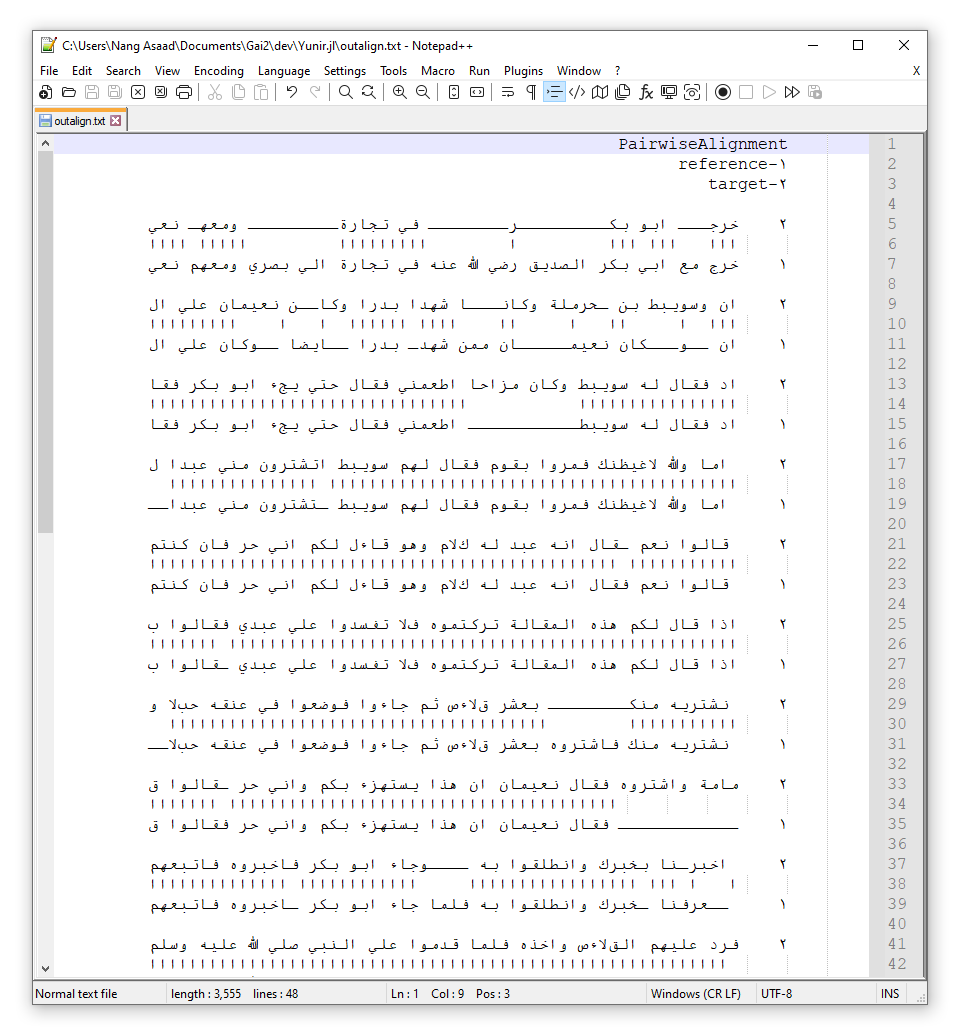
The result of the alignment is a list of groups of reference text indicated by the Arabic character ١, and the target texts indicated by the Arabic character ٢.
- Match, if the characters of reference and target did match, a Alif (i.e., ا) between their rows is placed.
- Deletion, if a tatweel (i.e., "ـ") is present in the target text, it means those tatweels represent the deletion of characters from the reference text.
- Insertion, if a tatweel is present in the reference text, it means an insertion of characters was done in the target text.
- Mismatch, if both characters of target and reference texts did not match, a space is inserted between their rows.
If we did not normalize the word "الله" into a single character, there would be four Alif if all letters did match, but because most software prints this as a single character, then there will be four Alif for a single character, and this will make the output confusing to readers. This is true for لا as well.
Alignment in Buckwalter
We can actually extract the encoded version, which is in extended Buckwalter transliteration mapping. This can be accessed via the .alignment property of the res above. That is,
julia> res1.alignmentBioAlignments.PairwiseAlignment{String, String}:
  seq:   1 xrj--- Abw bk---------r-------- fy tjArp--------- wmEh- nEym  30
           |||   ||| |||         |        |||||||||         ||||| |||||
  ref:   1 xrj mE Aby bkr AlSdyq rDy G Enh fy tjArp Aly bSry wmEhm nEym  60

  seq:  31 An wswybT bn Hrmlp wkAnA $hdA bdrA wkAn nEymAn Ely AlzAd fqA  90
           |||  |   | |   |  |   | |||| ||||||  |      ||||||||||||||||
  ref:  61 An --wkAn -n-EymAn -mmn- $hd- bdrA --AyDA wkAn Ely AlzAd fqA 111

  seq:  91 l lh swybT wkAn mzAHA ATEmny fqAl Hty yj' Abw bkr fqAl AmA w 150
           ||||||||||           |||||||||||||||||||||||||||||||||||||||
  ref: 112 l lh swybT----------- ATEmny fqAl Hty yj' Abw bkr fqAl AmA w 160

  seq: 151 G LgyZnk fmrwA bqwm fqAl lhm swybT At$trwn mny EbdA ly qAlwA 210
           ||||||||||||||||||||||||||||||||||| |||||||||||||||   ||||||
  ref: 161 G LgyZnk fmrwA bqwm fqAl lhm swybT -t$trwn mny EbdA--- qAlwA 216

  seq: 211  nEm -qAl Anh Ebd lh kLm whw qA'l lkm Any Hr fAn kntm A*A qA 269
           ||||| ||||||||||||||||||||||||||||||||||||||||||||||||||||||
  ref: 217  nEm fqAl Anh Ebd lh kLm whw qA'l lkm Any Hr fAn kntm A*A qA 276

  seq: 270 l lkm h*h AlmqAlp trktmwh fL tfsdwA Ely Ebdy fqAlwA bl n$try 329
           ||||||||||||||||||||||||||||||||||||||||||||| ||||||||||||||
  ref: 277 l lkm h*h AlmqAlp trktmwh fL tfsdwA Ely Ebdy -qAlwA bl n$try 335

  seq: 330 h mnk-------- bE$r qL'S vm jA'wA fwDEwA fy Enqh HbL wEmAmp w 381
           |||||        ||||||||||||||||||||||||||||||||||||||
  ref: 336 h mnk fA$trwh bE$r qL'S vm jA'wA fwDEwA fy Enqh HbL--------- 386

  seq: 382 A$trwh fqAl nEymAn An h*A ysthz' bkm wAny Hr -qAlwA qd Axbrn 440
                 ||||||||||||||||||||||||||||||||||||||| |||||||||    |
  ref: 386 ------ fqAl nEymAn An h*A ysthz' bkm wAny Hr fqAlwA qd -Erfn 439

  seq: 441 A bxbrk wAnTlqwA bh ----wjA' Abw bkr fAxbrwh fAtbEhm frd Ely 496
           || |||||||||||||||||     |||||||||||| ||||||||||||||| ||||||
  ref: 440 A -xbrk wAnTlqwA bh flmA jA' Abw bkr -Axbrwh fAtbEhm wrd Ely 497

  seq: 497 hm AlqL'S wAx*h flmA qdmwA Ely Alnby Sly G Elyh wslm Axbrwh  556
           ||||||||||||||||||||||||||||||||||||||||||||||||||||||||||||
  ref: 498 hm AlqL'S wAx*h flmA qdmwA Ely Alnby Sly G Elyh wslm Axbrwh  557

  seq: 557 fDHk hw wASHAbh mn-hmA Hwl 581
           ||||||||||||||||||    |||
  ref: 558 fDHk hw wASHAbh mn *lk HwL 583
This is the same with the previous result above, but this one is the Buckwalter encoded Arabic input.
The number in the left side is the index of the first character in the row, whereas the number in the right side is the index of the last character in the row.
Alignment statistics
From the results above, we can extract the score of the alignment which is a distance measure between the reference and the target texts. The lower the score the similar the two texts therefore.
julia> score(res1)113
Other statistics are as follows
julia> count_matches(res1)513julia> count_mismatches(res1)25julia> count_insertions(res1)43julia> count_deletions(res1)45julia> count_aligned(res1)626
Multiple Alignments
At times, especially when working with books, the input texts are long enough that it becomes computationally expensive to do the alignment directly. A simple solution is to partition the input texts into parts and do the alignment, pairing the texts by permutation. For example, in the KITAB's text reuse use case the books are partitioned into "milestone" which is indicated by a prefix ms in the texts. To mimick this, we'll add ms into the shamela0012129 and shamela0023790 as follows:
julia> shamela0012129 = Ar("خرج مع ابي بكر الصديق رضي الله عنه في تجارة الي بصري ومعهم نعيمان وكان نعيمان ممن شهد——- بدرا ايضا وك——-ان علي الزاد فقال له سويبط———– اطعمني فقال حتي يجء ابو بكر فقال اما والله لاغيظنك فمروا بقوم فقال لهم سويبط -تشترون مني عبدا قا—لوا نعم فقال انه عبد له كلام وهو قاءل لكم اني حر فان كنتم اذا قال لكم هذهmsتركتموه فلا تفسدوا علي عبدي قا-لوا بل نشتريه منك فاشتروه بعشر قلاءص ثم جاءوا فوضعوا في عنقه حبلا ف—————قال نعيمان ان هذا يستهزء بكم واني حر فقالوا قد عرفنا –خبرك وانطلقوا به فلما جاء ابو بكر -اخبروه فاتبعهم ورد عليهم القلاءص واخذه فلما قدموا علي النبي صلي الله عليه وسلم اخبروه فضحك هو واصحابه من ذلك حولا");julia> shamela0023790 = Ar("خرج— ابو بكر——————– في تجارة——— ومعه- نعيمان وسويبط بن حرملة وكانا شهدا بدر—–ا وكان نعيمان علي الزاد فقال له سويبط وكان مزاحا اطعمني فقال حتي يجء ابو بكر فقال اما والله لاغيظنك فمروا بقوم فقال لهم سويبط اتشترون مني عبدا لي قالوا نعم ق-ال انه عبد له كلام وهو قاءل لكم اني حر فان كنتم اذا قال لكم هذه المقالة تركتموهmsفلا تفسدوا علي عبدي فقالوا بل نشتريه منك——– بعشر قلاءص ثم جاءوا فوضعوا في عنقه حبلا وعمامة واشتروه فقال نعيمان ان هذا يستهزء بكم واني حر قا-لوا قد اخبرنا بخبرك وانطلقوا به و—-جاء ابو بكر فاخبروه فاتبعهم فرد عليهم القلاءص واخذه فلما قدموا علي النبي صلي الله عليه وسلم اخبروه فضحك هو واصحابه منهما- حول");
We will then split this into milestones,
julia> shamela0012129 = Ar.(string.(split(shamela0012129, "ms")))2-element Vector{Ar}: Ar("خرج مع ابي بكر الصديق رضي الله عنه في تجارة الي بصري ومعهم نعيمان وكان نعيمان ممن شهد——- بدرا ايضا وك——-ان علي الزاد فقال له سويبط———– اطعمني فقال حتي يجء ابو بكر فقال اما والله لاغيظنك فمروا بقوم فقال لهم سويبط -تشترون مني عبدا قا—لوا نعم فقال انه عبد له كلام وهو قاءل لكم اني حر فان كنتم اذا قال لكم هذه") Ar("تركتموه فلا تفسدوا علي عبدي قا-لوا بل نشتريه منك فاشتروه بعشر قلاءص ثم جاءوا فوضعوا في عنقه حبلا ف—————قال نعيمان ان هذا يستهزء بكم واني حر فقالوا قد عرفنا –خبرك وانطلقوا به فلما جاء ابو بكر -اخبروه فاتبعهم ورد عليهم القلاءص واخذه فلما قدموا علي النبي صلي الله عليه وسلم اخبروه فضحك هو واصحابه من ذلك حولا")julia> shamela0023790 = Ar.(string.(split(shamela0023790, "ms")))2-element Vector{Ar}: Ar("خرج— ابو بكر——————– في تجارة——— ومعه- نعيمان وسويبط بن حرملة وكانا شهدا بدر—–ا وكان نعيمان علي الزاد فقال له سويبط وكان مزاحا اطعمني فقال حتي يجء ابو بكر فقال اما والله لاغيظنك فمروا بقوم فقال لهم سويبط اتشترون مني عبدا لي قالوا نعم ق-ال انه عبد له كلام وهو قاءل لكم اني حر فان كنتم اذا قال لكم هذه المقالة تركتموه") Ar("فلا تفسدوا علي عبدي فقالوا بل نشتريه منك——– بعشر قلاءص ثم جاءوا فوضعوا في عنقه حبلا وعمامة واشتروه فقال نعيمان ان هذا يستهزء بكم واني حر قا-لوا قد اخبرنا بخبرك وانطلقوا به و—-جاء ابو بكر فاخبروه فاتبعهم فرد عليهم القلاءص واخذه فلما قدموا علي النبي صلي الله عليه وسلم اخبروه فضحك هو واصحابه منهما- حول")
Then as before, we clean the splitted texts:
julia> shamela0012129_cln = clean.(shamela0012129)2-element Vector{Ar}: Ar("خرج مع ابي بكر الصديق رضي الله عنه في تجارة الي بصري ومعهم نعيمان وكان نعيمان ممن شهد بدرا ايضا وكان علي الزاد فقال له سويبط اطعمني فقال حتي يجء ابو بكر فقال اما والله لاغيظنك فمروا بقوم فقال لهم سويبط تشترون مني عبدا قالوا نعم فقال انه عبد له كلام وهو قاءل لكم اني حر فان كنتم اذا قال لكم هذه") Ar("تركتموه فلا تفسدوا علي عبدي قالوا بل نشتريه منك فاشتروه بعشر قلاءص ثم جاءوا فوضعوا في عنقه حبلا فقال نعيمان ان هذا يستهزء بكم واني حر فقالوا قد عرفنا خبرك وانطلقوا به فلما جاء ابو بكر اخبروه فاتبعهم ورد عليهم القلاءص واخذه فلما قدموا علي النبي صلي الله عليه وسلم اخبروه فضحك هو واصحابه من ذلك حولا")julia> shamela0023790_cln = clean.(shamela0023790)2-element Vector{Ar}: Ar("خرج ابو بكر في تجارة ومعه نعيمان وسويبط بن حرملة وكانا شهدا بدرا وكان نعيمان علي الزاد فقال له سويبط وكان مزاحا اطعمني فقال حتي يجء ابو بكر فقال اما والله لاغيظنك فمروا بقوم فقال لهم سويبط اتشترون مني عبدا لي قالوا نعم قال انه عبد له كلام وهو قاءل لكم اني حر فان كنتم اذا قال لكم هذه المقالة تركتموه") Ar("فلا تفسدوا علي عبدي فقالوا بل نشتريه منك بعشر قلاءص ثم جاءوا فوضعوا في عنقه حبلا وعمامة واشتروه فقال نعيمان ان هذا يستهزء بكم واني حر قالوا قد اخبرنا بخبرك وانطلقوا به وجاء ابو بكر فاخبروه فاتبعهم فرد عليهم القلاءص واخذه فلما قدموا علي النبي صلي الله عليه وسلم اخبروه فضحك هو واصحابه منهما حول")
In Julia, we suffix the name of the function with . to broadcast the function to each item of the list. In this case, we clean each splitted texts.
Next, we normalize the characters as before:
julia> mapping = Dict( "الله" => "ﷲ", "لا" => "ﻻ" );julia> shamela0012129_nrm = map(x -> normalize(x, mapping), shamela0012129_cln)2-element Vector{Ar}: Ar("خرج مع ابي بكر الصديق رضي ﷲ عنه في تجارة الي بصري ومعهم نعيمان وكان نعيمان ممن شهد بدرا ايضا وكان علي الزاد فقال له سويبط اطعمني فقال حتي يجء ابو بكر فقال اما وﷲ ﻻغيظنك فمروا بقوم فقال لهم سويبط تشترون مني عبدا قالوا نعم فقال انه عبد له كﻻم وهو قاءل لكم اني حر فان كنتم اذا قال لكم هذه") Ar("تركتموه فﻻ تفسدوا علي عبدي قالوا بل نشتريه منك فاشتروه بعشر قﻻءص ثم جاءوا فوضعوا في عنقه حبﻻ فقال نعيمان ان هذا يستهزء بكم واني حر فقالوا قد عرفنا خبرك وانطلقوا به فلما جاء ابو بكر اخبروه فاتبعهم ورد عليهم القﻻءص واخذه فلما قدموا علي النبي صلي ﷲ عليه وسلم اخبروه فضحك هو واصحابه من ذلك حوﻻ")julia> shamela0023790_nrm = map(x -> normalize(x, mapping), shamela0023790_cln)2-element Vector{Ar}: Ar("خرج ابو بكر في تجارة ومعه نعيمان وسويبط بن حرملة وكانا شهدا بدرا وكان نعيمان علي الزاد فقال له سويبط وكان مزاحا اطعمني فقال حتي يجء ابو بكر فقال اما وﷲ ﻻغيظنك فمروا بقوم فقال لهم سويبط اتشترون مني عبدا لي قالوا نعم قال انه عبد له كﻻم وهو قاءل لكم اني حر فان كنتم اذا قال لكم هذه المقالة تركتموه") Ar("فﻻ تفسدوا علي عبدي فقالوا بل نشتريه منك بعشر قﻻءص ثم جاءوا فوضعوا في عنقه حبﻻ وعمامة واشتروه فقال نعيمان ان هذا يستهزء بكم واني حر قالوا قد اخبرنا بخبرك وانطلقوا به وجاء ابو بكر فاخبروه فاتبعهم فرد عليهم القﻻءص واخذه فلما قدموا علي النبي صلي ﷲ عليه وسلم اخبروه فضحك هو واصحابه منهما حول")
And we encode them as follows
julia> shamela0012129_enc = encode.(shamela0012129_nrm)2-element Vector{Bw}: Bw("xrj mE Aby bkr AlSdyq rDy G Enh fy tjArp Aly bSry wmEhm nEymAn wkAn nEymAn mmn $hd bdrA AyDA wkAn Ely AlzAd fqAl lh swybT ATEmny fqAl Hty yj' Abw bkr fqAl AmA wG LgyZnk fmrwA bqwm fqAl lhm swybT t$trwn mny EbdA qAlwA nEm fqAl Anh Ebd lh kLm whw qA'l lkm Any Hr fAn kntm A*A qAl lkm h*h") Bw("trktmwh fL tfsdwA Ely Ebdy qAlwA bl n$tryh mnk fA$trwh bE$r qL'S vm jA'wA fwDEwA fy Enqh HbL fqAl nEymAn An h*A ysthz' bkm wAny Hr fqAlwA qd ErfnA xbrk wAnTlqwA bh flmA jA' Abw bkr Axbrwh fAtbEhm wrd Elyhm AlqL'S wAx*h flmA qdmwA Ely Alnby Sly G Elyh wslm Axbrwh fDHk hw wASHAbh mn *lk HwL")julia> shamela0023790_enc = encode.(shamela0023790_nrm)2-element Vector{Bw}: Bw("xrj Abw bkr fy tjArp wmEh nEymAn wswybT bn Hrmlp wkAnA $hdA bdrA wkAn nEymAn Ely AlzAd fqAl lh swybT wkAn mzAHA ATEmny fqAl Hty yj' Abw bkr fqAl AmA wG LgyZnk fmrwA bqwm fqAl lhm swybT At$trwn mny EbdA ly qAlwA nEm qAl Anh Ebd lh kLm whw qA'l lkm Any Hr fAn kntm A*A qAl lkm h*h AlmqAlp trktmwh") Bw("fL tfsdwA Ely Ebdy fqAlwA bl n$tryh mnk bE$r qL'S vm jA'wA fwDEwA fy Enqh HbL wEmAmp wA$trwh fqAl nEymAn An h*A ysthz' bkm wAny Hr qAlwA qd AxbrnA bxbrk wAnTlqwA bh wjA' Abw bkr fAxbrwh fAtbEhm frd Elyhm AlqL'S wAx*h flmA qdmwA Ely Alnby Sly G Elyh wslm Axbrwh fDHk hw wASHAbh mnhmA Hwl")
Finally, we run the alignment.
julia> res2, scr = align(shamela0012129_enc, shamela0023790_enc);[ Info: 50.0%, aligning 1st reference milestone to all target milestone.
[ Info: 100.0%, aligning 2nd reference milestone to all target milestone.
Note that if the input texts are Array or Matrix the align function returns a tuple, comprising of the result of the alignment in Matrix, and the corresponding scores in Matrix.
Here is the score of the comparison, where the rows correspond to the index of the partitions of the reference text, and the columns correspond to the index of the partitions of the target text.
julia> scr2×2 Matrix{Int64}:
  87  216
 218   50
The corresponding result of the score is also a Matrix, but it is huge since each cell of the matrix correspond to the result of the alignment and printing it would be difficult to understand. It is therefore better to simply index the Matrix to view only part of it.
For example, the corresponding result of the score in the first row first column is given below
julia> res2[1,1] # result of the score scr[1,1]PairwiseAlignment
١-reference
٢-target

٢    خرجـــ ابو بكـــــــــرــــــــ في تجارةـــــــــ ومعهـ نعي
     ااا   ااا ااا         ا        ااااااااا         ااااا اااا
١    خرج مع ابي بكر الصديق رضي ﷲ عنه في تجارة الي بصري ومعهم نعي

٢    ان وسويبط بن حرملة وكانا شهدا بدرا وكان نعيمان علي الزاد فق
     ااا  ا   ا ا   ا  ا   ا اااا اااااا  ا      ااااااااااااااا
١    ان ــوكان ـنـعيمان ـممنـ شهدـ بدرا ــايضا وكان علي الزاد فق

٢    ل له سويبط وكان مزاحا اطعمني فقال حتي يجء ابو بكر فقال اما
     اااااااااا           اااااااااااااااااااااااااااااااااااااا
١    ل له سويبطـــــــــــ اطعمني فقال حتي يجء ابو بكر فقال اما

٢    ﷲ ﻻغيظنك فمروا بقوم فقال لهم سويبط اتشترون مني عبدا لي قالو
     ااااااااااااااااااااااااااااااااااا ااااااااااااااا   ااااا
١    ﷲ ﻻغيظنك فمروا بقوم فقال لهم سويبط ـتشترون مني عبداـــ قالو

٢     نعم ـقال انه عبد له كﻻم وهو قاءل لكم اني حر فان كنتم اذا ق
     ااااا ااااااااااااااااااااااااااااااااااااااااااااااااااااا
١     نعم فقال انه عبد له كﻻم وهو قاءل لكم اني حر فان كنتم اذا ق
For the result of the score in the second row first column, we have
julia> res2[2,1] # result of the score scr[2,1]PairwiseAlignment
١-reference
٢-target

٢    خرج ابو بكر في تـجارة ومعه نعيمان وسويبط بن حرملة وكانا شهد
      ا    ا    اا اا     ا       ا    ا   ا ا ا  ا     ا  ا
١    ترـكتموـــه فﻻ تفسدوا علي عبدي قالوـا بل ـنشتريه منك فاشترو

٢     بدرا وكان نعيمان علي الزاد فقال له سويبط وكان مزاحاـ اطعمن
     اا   ا    ا    ا         ا اا     اا   ا ا  ا ا    ا اا   ا
١     بعشر قﻻءص ثم جاءوا فوضعواـ في عنقه ــحبﻻ فقال نعيمان اـــن

٢     فقال حتــي يجء ـابو بكر فقال اما وﷲ ﻻغيظنك فمرــواـ بقوـــ
     ا  ا   ا   ا   ا ا  ا  اااااا   اا  ا    ا ا  ا  اا   اا
١     هذا يستهزء بكم واني ـحر فقالــوا قد ـعرفنا خبرك وانطلقوا ب

٢     فقال لهم ـسويبـط اتشترون مني عبدا لي قالوا نعم قال انه عبد
     اا   ا   ا  ا ا  اا   اا ا    ا   ا     ا     اا اا    ا
١     فلما جاء ابو بكر اـخبروه فاتبعـهم ورد علـــيهم ـالقﻻءص ـوا

٢    له كﻻمـ ـوهوـ قاءل لـكم اني حر فان كنتم اذا قال لكم هذه اــ
      اا  ا ا   ا ا     ا   ا  اا      ا   ااا          اا   ا
١    ذه فلما قدموا علي النبي صلي ﷲ عليه وسلم اخبروه فضحك هو واصح
Finally, as before we can extract the statistics for each result:
julia> count_matches(res2[2,1])95julia> count_mismatches(res2[2,1])175julia> count_insertions(res2[2,1])24julia> count_deletions(res2[2,1])19julia> count_aligned(res2[2,1])313
Visualization
In this section, we are going to display the alignment by plotting the results.
f, a, xys = plot(res1, :matches, nchars=60)
a[1].xlabel = "Shamela0023790"
a[1].xlabelsize = 20
a[1].xticks = 0:2:unique(xys[1][1])[end]
a[3].xlabel = "Shamela0012129"
a[3].xlabelsize = 20
a[3].xticks = 0:2:unique(xys[2][1])[end]
f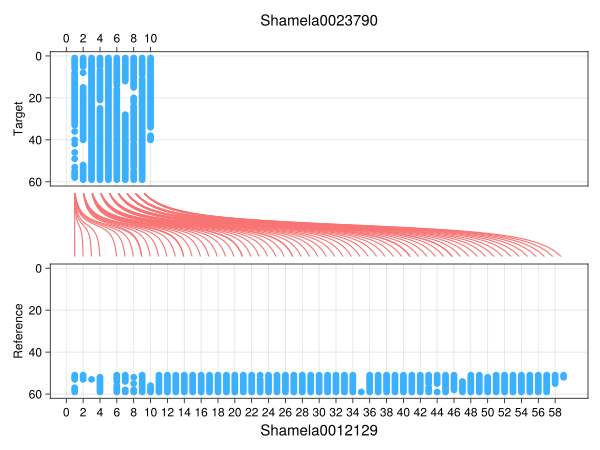
The figure above is divided into three subplots arranged in rows. You can think of the figure as two input text displayed in horizontal (i.e, sideways) orientation. In this orientation, the x-axis becomes the rows of the texts, that is, you can think of the x-axis as the rows of the texts in the book. In this case, we have two books, the reference and the target books. Each dot in reference and target corresponds to the characters that have matched. The lines and curves in the middle (colored in red) represent the connections of the rows of the texts where the matched happened. Further, the y-axis correspond to the length of the rows, in this case 60 characters per row. As you can see, the top tick label of the y-axis is 0 and the bottom tick label of the y-axis is 60, this is because the writing of Arabic is right-to-left, and so we can think of the 0th-tick at the top as the starting index of the first character in both texts, and the row ends at the 60th-tick at the bottom.
We added further customization to the plot, readers are encouraged to explore the API.
As for the plot of insertions of characters, we have:
f, a, xys = plot(res1, :insertions, nchars=60)
a[1].xlabel = "Shamela0023790"
a[1].xlabelsize = 20
a[1].xticks = 0:2:unique(xys[1][1])[end]
a[3].xlabel = "Shamela0012129"
a[3].xlabelsize = 20
a[3].xticks = 0:2:unique(xys[2][1])[end]
f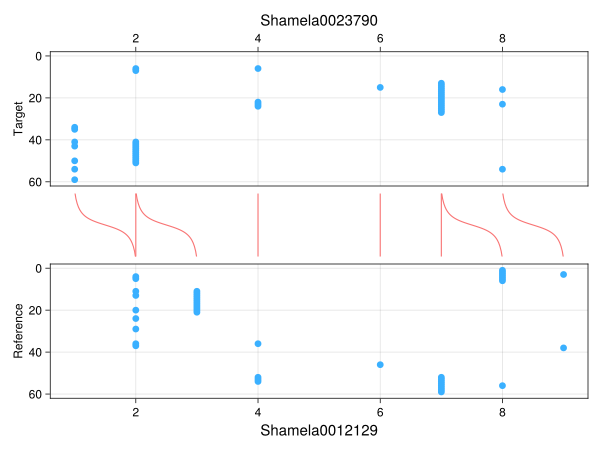
For deletions, we have:
f, a, xys = plot(res1, :deletions, nchars=60)
a[1].xlabel = "Shamela0023790"
a[1].xlabelsize = 20
a[1].xticks = 0:2:unique(xys[1][1])[end]
a[3].xlabel = "Shamela0012129"
a[3].xlabelsize = 20
a[3].xticks = 0:2:unique(xys[2][1])[end]
f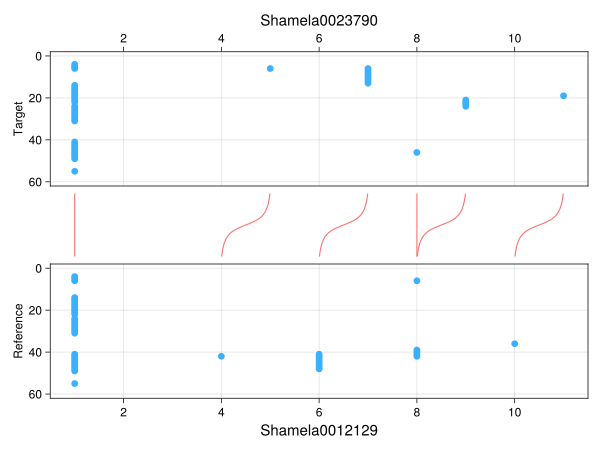
And for mismatches, we have
f, a, xys = plot(res1, :mismatches, nchars=60)
a[1].xlabel = "Shamela0023790"
a[1].xlabelsize = 20
a[1].xticks = 0:2:unique(xys[1][1])[end]
a[3].xlabel = "Shamela0012129"
a[3].xlabelsize = 20
a[3].xticks = 0:2:unique(xys[2][1])[end]
f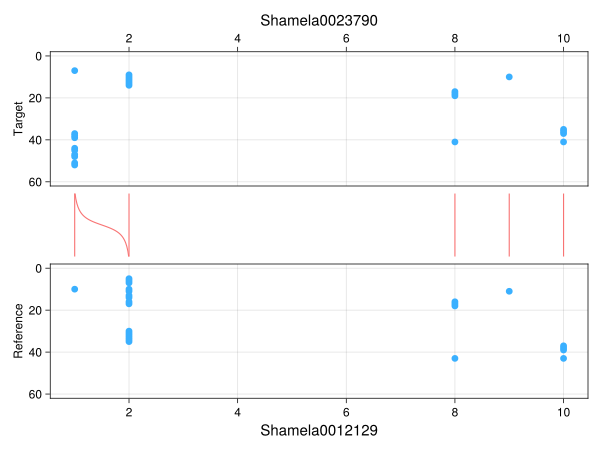
Cost Model
The pairwise alignment above works by minimizing a cost function, which is defined by a cost model. It is important that we understand how the cost model is setup so that we can give proper scoring for the mismatches, matches, deletions and insertions. To define a cost model, we use BioAligments.jl's CostModel struct.
The default cost model is given by
julia> using BioAlignmentsjulia> costmodel = CostModel(match=0, mismatch=1, insertion=1, deletion=1)BioAlignments.CostModel{Int64}(BioAlignments.DichotomousSubstitutionMatrix{Int64}: match = 0 mismatch = 1, 1, 1)
The instantiated costmodel above tells us that, if a matched happened between the characters of the reference and the target texts, we set it to 0. Otherwise, that is, if mismatch, insertions or deletions happened, then the distance is 1.
The alignment is optimized by minimizing the cost function defined by the cost model, by prioritizing matches since it gives the algorithm a lower distance (which is 0)
If we set the costmodel to the following,
julia> using BioAlignmentsjulia> costmodel = CostModel(match=0, mismatch=10, insertion=3, deletion=1)BioAlignments.CostModel{Int64}(BioAlignments.DichotomousSubstitutionMatrix{Int64}: match = 0 mismatch = 10, 3, 1)
Then if a mismatch happened, the algorithm will instead consider it a deletion as much as possible to avoid a distance score of 10 (for mismatch) and go for a distance of 1 (for deletion) instead.
Consider the following example,
julia> using Yunirjulia> @transliterator :defaultjulia> etgt = Ar("رضي الله عنه")Ar("رضي الله عنه")julia> eref = Ar("صلي الله عليه وسلم")Ar("صلي الله عليه وسلم")julia> mapping = Dict("الله" => "ﷲ",)Dict{String, String} with 1 entry: "الله" => "ﷲ"julia> etgt_nrm = normalize(etgt, mapping)Ar("رضي ﷲ عنه")julia> eref_nrm = normalize(eref, mapping)Ar("صلي ﷲ عليه وسلم")julia> costmodel = CostModel(match=0, mismatch=1, insertion=1, deletion=1);julia> res_c1 = align(encode(eref_nrm), encode(etgt_nrm), costmodel=costmodel)PairwiseAlignment ١-reference ٢-target ٢ رضي ﷲ عـنهــــ ااااا ا ١ صلي ﷲ عليه وسلjulia> res_c1PairwiseAlignment ١-reference ٢-target ٢ رضي ﷲ عـنهــــ ااااا ا ١ صلي ﷲ عليه وسل
Now, compare the result if we increased the mismatch and insertion in the cost model.
julia> costmodel = CostModel(match=0, mismatch=10, insertion=5, deletion=1)BioAlignments.CostModel{Int64}(BioAlignments.DichotomousSubstitutionMatrix{Int64}: match = 0 mismatch = 10, 5, 1)julia> res_c2 = align(encode(eref_nrm), encode(etgt_nrm), costmodel=costmodel)PairwiseAlignment ١-reference ٢-target ٢ رضــي ﷲ عنــهــــ ااااا ا ١ ــصلي ﷲ عـليه وسلjulia> res_c2PairwiseAlignment ١-reference ٢-target ٢ رضــي ﷲ عنــهــــ ااااا ا ١ ــصلي ﷲ عـليه وسل
You can copy and paste the result to any text editor with Arabic monospace, like in Notepad++ screenshot above to see the alignment properly.
You will notice that, in res_c1 above we have 3 mismatches, but in res_c2 the algorithm avoided assigning mismatches and instead prioritized deletions and insertions. This can be confirmed below:
julia> count_mismatches(res_c1)3julia> count_deletions(res_c1)6julia> count_insertions(res_c1)0julia> count_mismatches(res_c2)0julia> count_deletions(res_c2)9julia> count_insertions(res_c2)3