Rhythmic Analysis
This section will demonstrate the APIs of Yunir.jl for doing rhythmic analysis. These APIs are mainly based in the recent work of Asaad [1]. To do this, there are two types of text that will be studied, and these are pre-Islamic poetry and the Holy Qur'an.
Arabic Poetry
The first data is from a well known author, Al-Mutanabbi المتنبّي, who authored several poetry including the titled 'Indeed, every woman with a swaying walk', which will be the basis for this section.
Loading Data
The following codes assign the said poem of Al-Mutanabbi to a variable poem.
using Yunir
@transliterator :default

poem = """
    أَلَا كُلُّ مَاشِيَةِ الخَيْزَلَى؛
    فِدًى كُلِّ مَاشِيَةِ الهَيْذَبَى؛
    وَكُلِّ نَجَاةٍ بُجَاوِيَّةٍ،
    خَنُوفٍ وَمَا بِي حُسْنُ المِشَى؛
    وَلَكِنَّهُنَّ حِبَالُ الحَيَاةِ،
    وَكَيْدُ العُدَاةِ وَمَيْطُ الأَذَى؛
    ضَرَبْتُ بِهَا التِّيهَ ضَرْبَ القِمَا
    رِ إِمَّا لِهَذَا وَإِمَّا لِذَا؛
    إِذَا فَزِعَتْ قَدَّمَتْهَا الجِيَادُ،
    وَبِيضُ السُّيُوفِ وَسُمْرُ القَنَا؛
    فَمَرَّتْ بِنَخْلٍ وَفِي رَكْبِهَا،
    عَنِ العَالَمِينَ وَعَنْهُ غِنَى؛
    وَأَمْسَتْ تُخَيِّرُنَا بِالنَّقَا،
    بِوَادِي المِيَاهِ وَوَادِي القُرَى؛
    وَقُلْنَا لَهَا أَيْنَ أَرْضُ العِرَاقِ؟
    فَقَالَتْ وَنَحْنُ بِتُرْبَانَهَا؛
    وَهَبَّتْ بِحِسْمَى هُبُوبَ الدَّبُو
    رِ مُسْتَقْبِلَاتٍ مَهَبَّ الصَّبَا؛
    رَوَامِي الكِفَافِ وَكِبْدِ الوِهَادِ،
    وَجَارِ البُوَيْرَةِ وَادِي الغَضَى؛
    وَجَابَتْ بُسَيْطَةَ جَوْبَ الرِّدَا،
    بَيْنَ النَّعَامِ وَبَيْنَ المَهَا؛
    إِلَى عُقْدَةِ الجَوْفِ حَتَّى شَفَتْ،
    بِمَاءِ الجُرَاوِيِّ بَعْضَ الصَّدَى؛
    وَلَاحَ لَهَا صَوَرٌ وَالصَّبَاحُ،
    وَلَاحَ الشَّغُورُ لَهَا وَالضُّحَى؛
    وَمَسَّى الجُمَيْعِيَّ دِئْدَاؤُهَا،
    وَغَادَى الأَضَارِعَ ثُمَّ الدَّنَا؛
    فَيَا لَكَ لَيْلًا عَلَى أَعْكُشٍ،
    أَحَمَّ البِلَادِ خَفِيَّ الصُّوَى؛
    وَرَدْنَا الرُّهَيْمَةَ فِي جَوْزِهِ،
    وَبَاقِيهِ أَكْثَرُ مِمَّا مَضَى؛
    فَلَمَّا أَنَخْنَا رَكَزْنَا الرِّمَاحَ،
    بَيْنَ مَكَارِمِنَا وَالعُلَى؛
    وَبِتْنَا نُقَبِّلُ أَسْيَافَنَا،
    وَنَمْسَحُهَا مِنْ دِمَاءِ العِدَى؛
    لِتَعْلَمَ مِصْرُ وَمَنْ بِالعِرَاقِ،
    وَمَنْ بِالعَوَاصِمِ أَنِّي الفَتَى؛
    وَأَنِّي وَفَيْتُ وَأَنِّي أَبَيْتُ،
    وَأَنِّي عَتَوْتُ عَلَى مَنْ عَتَا؛
    وَمَا كُلُّ مَنْ قَالَ قَوْلًا وَفَى،
    وَلَا كُلُّ مَنْ سِيمَ خَسْفًا أَبَى؛
    وَلَا بُدَّ لِلْقَلْبِ مِنْ آلَةٍ،
    وَرَأْيٍ يُصَدِّعُ صُمَّ الصَّفَا؛
    وَمَنْ يَكُ قَلْبٌ كَقَلْبِي لَهُ،
    يَشُقُّ إِلَى العِزِّ قَلْبَ التَّوَى؛
    وَكُلُّ طَرِيقٍ أَتَاهُ الفَتَى،
    عَلَى قَدَرِ الرِّجْلِ فِيهِ الخُطَى؛
    وَنَامَ الخُوَيْدِمُ عَنْ لَيْلِنَا،
    وَقَدْ نَامَ قَبْلُ عَمًى لَا كَرَى؛
    وَكَانَ عَلَى قُرْبِنَا بَيْنَنَا،
    مَهَامِهُ مِنْ جَهْلِهِ وَالعَمَى؛
    وَمَنْ جَهِلَتْ نَفْسُهُ قَدْرَهُ،
    رَأَى غَيْرُهُ مِنْهُ مَا لَا يَرَى.
"""
" أَلَا كُلُّ مَاشِيَةِ الخَيْزَلَى؛\n فِدًى كُلِّ مَاشِيَةِ الهَيْذَبَى؛\n وَكُلِّ نَجَاةٍ بُجَاوِيَّةٍ،\n خَنُوفٍ وَمَا بِي حُسْنُ المِشَى؛\n وَلَكِنَّهُنَّ حِبَالُ الحَيَاةِ،\n وَكَيْدُ العُدَاةِ وَمَيْطُ الأَذَى؛\n ضَرَبْتُ بِهَا التِّيهَ ضَرْبَ القِمَا\n رِ إِمَّا لِهَذَا وَإِمَّا لِذَا؛\n إِذَا فَزِعَتْ قَدَّمَتْهَا الجِيَادُ،\n وَبِيضُ السُّيُوفِ وَسُمْرُ القَنَا؛\n فَمَرَّتْ بِنَخْلٍ وَفِي " ⋯ 2386 bytes ⋯ "يُصَدِّعُ صُمَّ الصَّفَا؛\n وَمَنْ يَكُ قَلْبٌ كَقَلْبِي لَهُ،\n يَشُقُّ إِلَى العِزِّ قَلْبَ التَّوَى؛\n وَكُلُّ طَرِيقٍ أَتَاهُ الفَتَى،\n عَلَى قَدَرِ الرِّجْلِ فِيهِ الخُطَى؛\n وَنَامَ الخُوَيْدِمُ عَنْ لَيْلِنَا،\n وَقَدْ نَامَ قَبْلُ عَمًى لَا كَرَى؛\n وَكَانَ عَلَى قُرْبِنَا بَيْنَنَا،\n مَهَامِهُ مِنْ جَهْلِهِ وَالعَمَى؛\n وَمَنْ جَهِلَتْ نَفْسُهُ قَدْرَهُ،\n رَأَى غَيْرُهُ مِنْهُ مَا لَا يَرَى.\n"Extracting Syllables
Next, let's try extracting the syllables for the first line. To do this, let's convert the text into a vector of stanzas of the poem. We therefore split the text on the ";\n" separator, where the \n is the code for line break. The function strip simply removes the whitespaces before and after each stanza.
texts = map(x -> Ar.(string.(strip(string(x)))), split.(poem, "\n"))55-element Vector{Ar}:
Ar("أَلَا كُلُّ مَاشِيَةِ الخَيْزَلَى؛")
Ar("فِدًى كُلِّ مَاشِيَةِ الهَيْذَبَى؛")
Ar("وَكُلِّ نَجَاةٍ بُجَاوِيَّةٍ،")
Ar("خَنُوفٍ وَمَا بِي حُسْنُ المِشَى؛")
Ar("وَلَكِنَّهُنَّ حِبَالُ الحَيَاةِ،")
Ar("وَكَيْدُ العُدَاةِ وَمَيْطُ الأَذَى؛")
Ar("ضَرَبْتُ بِهَا التِّيهَ ضَرْبَ القِمَا")
Ar("رِ إِمَّا لِهَذَا وَإِمَّا لِذَا؛")
Ar("إِذَا فَزِعَتْ قَدَّمَتْهَا الجِيَادُ،")
Ar("وَبِيضُ السُّيُوفِ وَسُمْرُ القَنَا؛")
⋮
Ar("وَكُلُّ طَرِيقٍ أَتَاهُ الفَتَى،")
Ar("عَلَى قَدَرِ الرِّجْلِ فِيهِ الخُطَى؛")
Ar("وَنَامَ الخُوَيْدِمُ عَنْ لَيْلِنَا،")
Ar("وَقَدْ نَامَ قَبْلُ عَمًى لَا كَرَى؛")
Ar("وَكَانَ عَلَى قُرْبِنَا بَيْنَنَا،")
Ar("مَهَامِهُ مِنْ جَهْلِهِ وَالعَمَى؛")
Ar("وَمَنْ جَهِلَتْ نَفْسُهُ قَدْرَهُ،")
Ar("رَأَى غَيْرُهُ مِنْهُ مَا لَا يَرَى.")
Ar("")Next is to initialize the syllabification for each stanza, suppose we want to capture the consonant before and after each vowel to represent one syllable. For example, for the word basmala, the syllabification if only the consonant preceding the vowel is considered then we have ba, ma, and la. To specify this configuration for the syllable, we do it as follows:
julia> syllable = Syllable(1, 0, 10)Syllable{Int64}(1, 0, 10)
Here the first argument represents the number of characters prior to the vowel is considered, the next argument which is 0 is the number of character after the vowel, and 10 in the third argument simply mean how many vowels do we need to capture for each word. So that, 10 here assures us that we capture all vowels of any word because most usually has less than 10 vowels.
julia> r = Syllabification(false, syllable)Syllabification(false, Syllable{Int64}(1, 0, 10))
Then, the following will syllabicize the first word in the said poem.
julia> r(
           Ar(string(split(texts[1], " ")[1])),
           first_word=true,
           silent_last_vowel=false
       )Segment(Bw(">a?laA"), Harakaat[Harakaat(Bw("a"), false), Harakaat(Bw("a"), false)])
The segment is defined here as the joined slices of the syllables. The first_word parameter checks if the input text is a first word of a sentence or phrase. Finally the last parameter aims to capture the case of silencing the vowel of the last word.
From the output above, there are two syllables, the first being أَ and the second is لَا, both are separated with ?.
It is important to note that syllabification works only on a fully diacritize text as in the input poem here, and that is because each syllable contain a vowel. If not fully diacritize, then the syllabification will consider a syllable with only consonant and no vowel.
So that, if we want to extract the syllables all lines in the poem, then:
# Process only the first 3 lines for demonstration
line_syllables = Array[]
for line in texts
    words = Ar.(string.(split(line.text, " ")))

    word_syllables = Segment[]
    i = 1
    for word in words
        if i === 1
            push!(word_syllables, r(word, first_word=true))
        elseif i === length(words)
            push!(word_syllables, r(word, first_word=false, silent_last_vowel=false))
        else
            push!(word_syllables, r(word, first_word=false))
        end
        i += 1
    end
    push!(line_syllables, word_syllables)
end
To extract the syllables of the words in first line of the poem, we run the following code:
julia> line_syllables[1]4-element Vector{Segment}:
 Segment(Bw(">a?laA"), Harakaat[Harakaat(Bw("a"), false), Harakaat(Bw("a"), false)])
 Segment(Bw("ku?lu"), Harakaat[Harakaat(Bw("u"), false), Harakaat(Bw("u"), false)])
 Segment(Bw("maAA?$i?ya?pi"), Harakaat[Harakaat(Bw("a"), false), Harakaat(Bw("i"), false), Harakaat(Bw("a"), false), Harakaat(Bw("i"), false)])
 Segment(Bw("xay?za?laYY"), Harakaat[Harakaat(Bw("a"), false), Harakaat(Bw("a"), false), Harakaat(Bw("a"), false)])
And for the last line of the poem
julia> line_syllables[end-1]6-element Vector{Segment}:
 Segment(Bw("ra?>aY"), Harakaat[Harakaat(Bw("a"), false), Harakaat(Bw("a"), false)])
 Segment(Bw("gay?ru?hu"), Harakaat[Harakaat(Bw("a"), false), Harakaat(Bw("u"), false), Harakaat(Bw("u"), false)])
 Segment(Bw("mi?hu"), Harakaat[Harakaat(Bw("i"), false), Harakaat(Bw("u"), false)])
 Segment(Bw("maA"), Harakaat[Harakaat(Bw("a"), false)])
 Segment(Bw("laA"), Harakaat[Harakaat(Bw("a"), false)])
 Segment(Bw("ya?raYY"), Harakaat[Harakaat(Bw("a"), false), Harakaat(Bw("a"), false)])
The indexing is set to end-1 because the last line of the texts variable is a blank line space as seen in the results of the texts variable assigned to the mapping function above.
Visualizing Last Syllable
This section will visualize the rhythmic pattern for the last syllable of a stanza or line of text, or in the context of the Qur'an last syllable of each verse.
The LastRecited visualization system provides a powerful way to analyze and visualize the patterns of ending syllables in Arabic texts, particularly useful for studying rhyme schemes in poetry and the Qur'an.
Understanding Visualization Variants
The visualization system offers three variants (A, B, and C) that show different levels of detail:
- Variant A: Shows only the last syllable (2 characters)
- Variant B: Shows two subplots - the syllable and syllable with trailing consonant
- Variant C: Shows three subplots - syllable, syllable with trailing consonant, and syllable with leading and trailing consonants
Basic Usage with Qur'an Data
Let's start with a simple example using Al-Fatihah (the opening chapter of the Qur'an):
# Al-Fatihah in Buckwalter transliteration
alfatihah_raw = Ar.([
    "بِسْمِ ٱللَّهِ ٱلرَّحْمَٰنِ ٱلرَّحِيمِ",
    "ٱلْحَمْدُ لِلَّهِ رَبِّ ٱلْعَٰلَمِينَ",
    "ٱلرَّحْمَٰنِ ٱلرَّحِيمِ",
    "مَٰلِكِ يَوْمِ ٱلدِّينِ",
    "إِيَّاكَ نَعْبُدُ وَإِيَّاكَ نَسْتَعِينُ",
    "ٱهْدِنَا ٱلصِّرَٰطَ ٱلْمُسْتَقِيمَ",
    "صِرَٰطَ ٱلَّذِينَ أَنْعَمْتَ عَلَيْهِمْ غَيْرِ ٱلْمَغْضُوبِ عَلَيْهِمْ وَلَا ٱلضَّآلِّينَ"
])
alfatihah_bw = encode.(alfatihah_raw)
7-element Vector{Bw}:
Bw("bisomi {ll~ahi {lr~aHoma`ni {lr~aHiymi")
Bw("{loHamodu lil~ahi rab~i {loEa`lamiyna")
Bw("{lr~aHoma`ni {lr~aHiymi")
Bw("ma`liki yawomi {ld~iyni")
Bw("<iy~aAka naEobudu wa<iy~aAka nasotaEiynu")
Bw("{hodinaA {lS~ira`Ta {lomusotaqiyma")
Bw("Sira`Ta {l~a*iyna >anoEamota Ealayohimo gayori {lomagoDuwbi Ealayohimo walaA {lD~aA^l~iyna")Creating a Simple Visualization (Variant A)
The simplest visualization shows only the last syllable:
using CairoMakie # Required for visualization

# Create visualization configuration
vis = RhythmicVis(LastRecited(A))

# Generate the visualization
fig, data = vis(alfatihah_bw)

# Extract the data
positions, syllable_mapping = data[1]

println("Syllable positions: ", positions)
println("Unique syllables: ", keys(syllable_mapping))

fig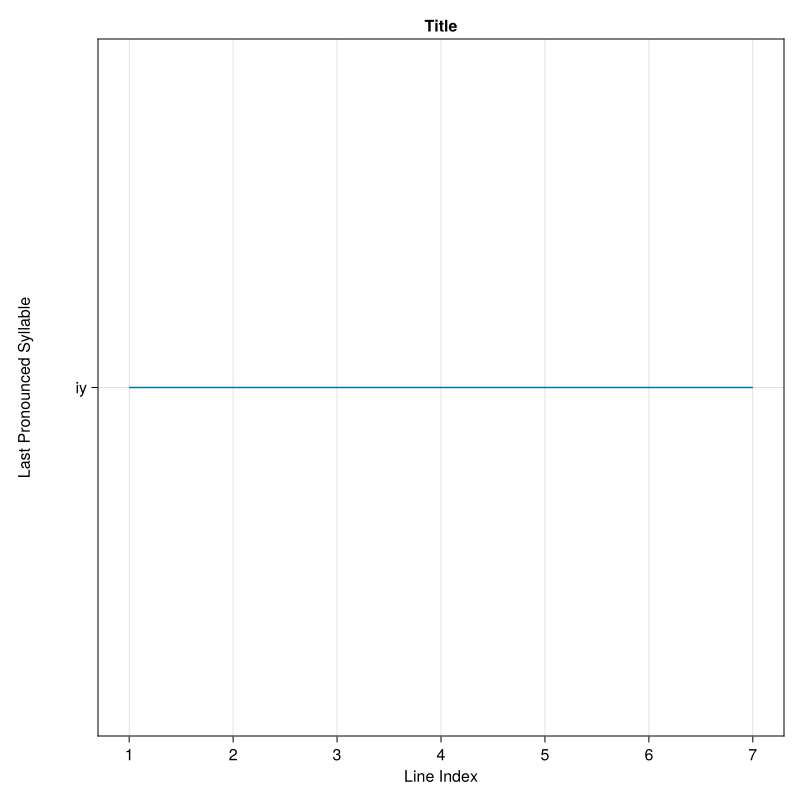
In this example, all verses end with the same syllable "iy", showing the consistent rhyme scheme of Al-Fatihah.
Two-Level Analysis (Variant B)
For more detailed analysis, Variant B shows how syllables differ when including the trailing consonant:
# Create variant B visualization
vis_b = RhythmicVis(LastRecited(B))

# Generate visualization
fig_b, data_b = vis_b(alfatihah_bw)

# Extract both datasets
positions1, syllable_map1 = data_b[1]
positions2, syllable_map2 = data_b[2]

println("First subplot - syllable only:")
println("  Positions: ", positions1)
println("  Unique syllables: ", length(syllable_map1))

println("\nSecond subplot - syllable + trailing:")
println("  Positions: ", positions2)
println("  Unique syllables: ", length(syllable_map2))

fig_b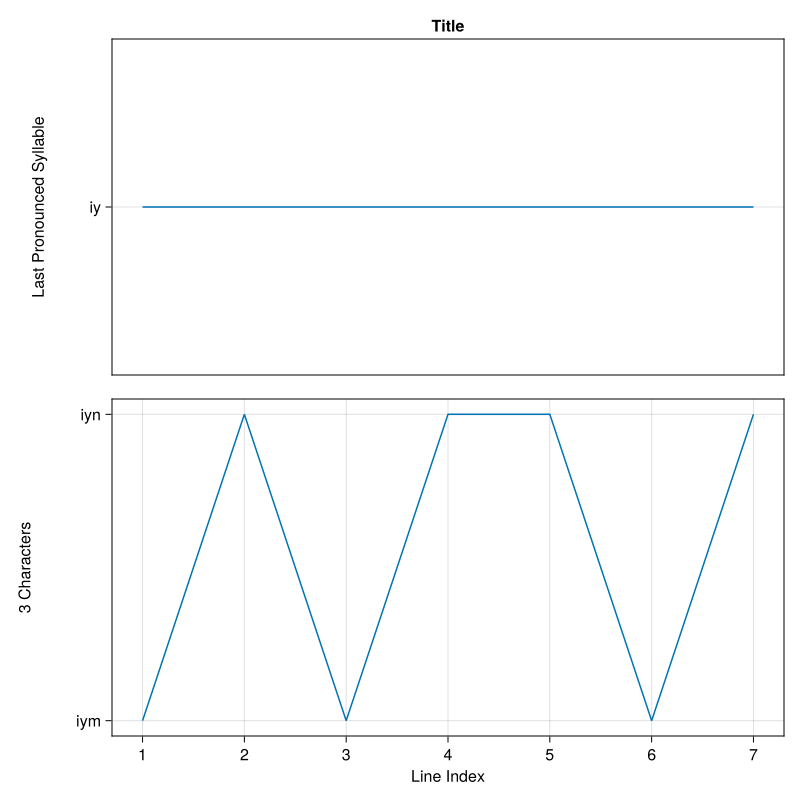
This shows that while all verses have the same core syllable, they vary in the trailing consonant (either "m" or "n").
Complete Analysis (Variant C)
The most comprehensive analysis uses Variant C with three subplots:
# Create variant C visualization
vis_c = RhythmicVis(LastRecited(C))

# Generate visualization with custom styling
fig_c, data_c = vis_c(alfatihah_bw, color=:blue, linewidth=2)

# Extract all three datasets
(pos1, map1), (pos2, map2), (pos3, map3) = data_c

println("Analysis of Al-Fatihah ending patterns:")
println("Subplot 1 (syllable): ", length(map1), " unique patterns")
println("Subplot 2 (+ trailing): ", length(map2), " unique patterns")
println("Subplot 3 (leading + trailing): ", length(map3), " unique patterns")

fig_c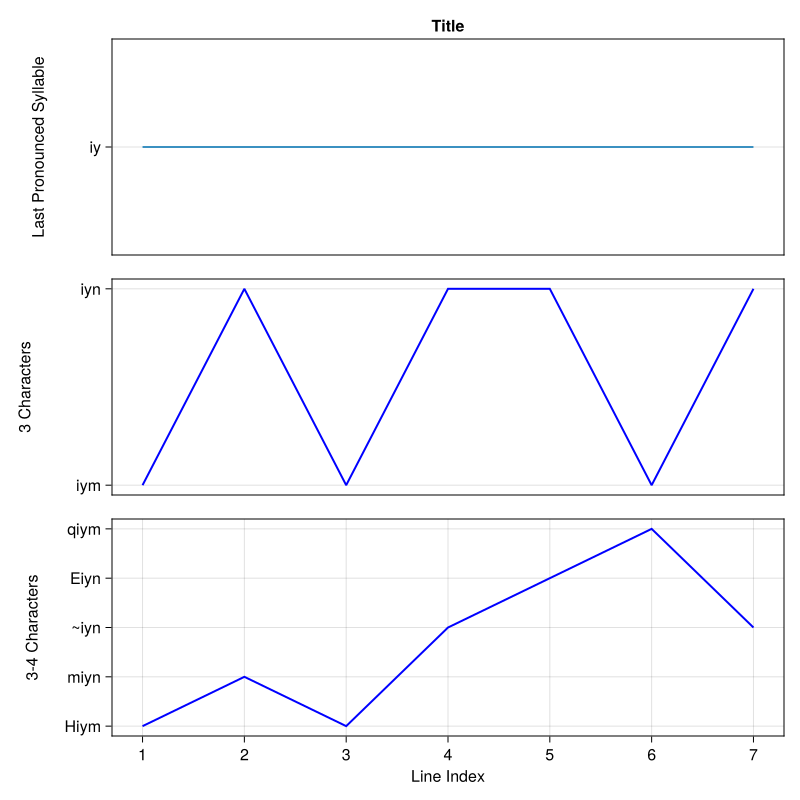
Analyzing Poetry
Now let's analyze the poem we loaded earlier to see its rhyme scheme:
# Convert poem lines to Buckwalter encoding
# Remove empty lines and encode
poem_lines = filter(x -> length(x) > 0, texts)
poem_bw = [encode(line) for line in poem_lines]

# Create visualization
vis_poem = RhythmicVis(LastRecited(C))
fig_poem, data_poem = vis_poem(poem_bw)

fig_poem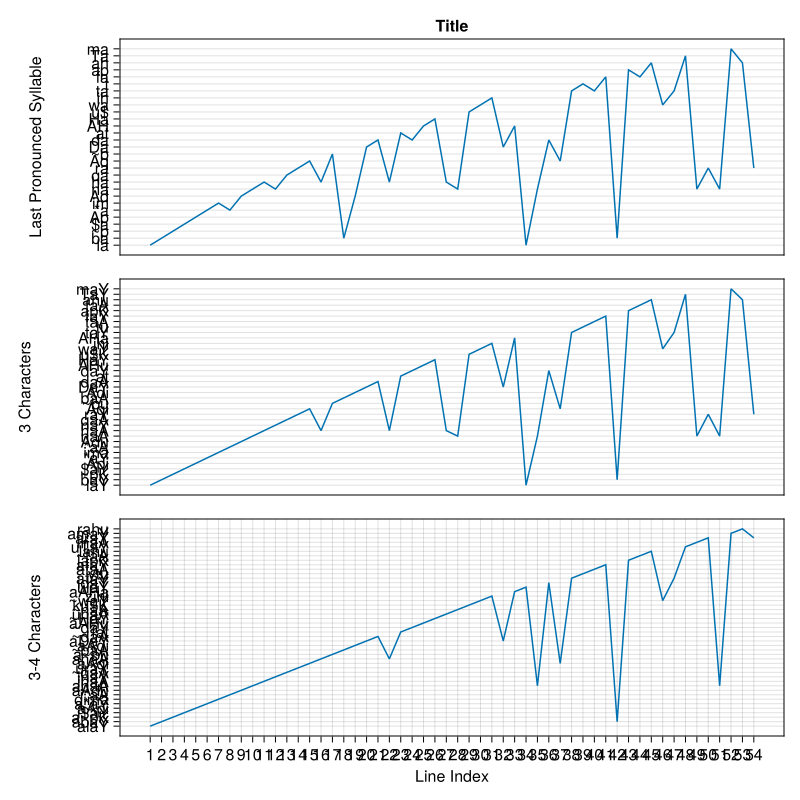
Customizing the Visualization
You can customize various aspects of the visualization:
using Makie

# Create custom figure
custom_fig = Figure(resolution=(1200, 800))

# Create visualization with custom parameters
vis_custom = RhythmicVis(LastRecited(B))

# Generate with custom styling
fig_styled, data_styled = vis_custom(
    alfatihah_bw,
    color=:red,
    linewidth=3,
    linestyle=:dash
)

fig_styled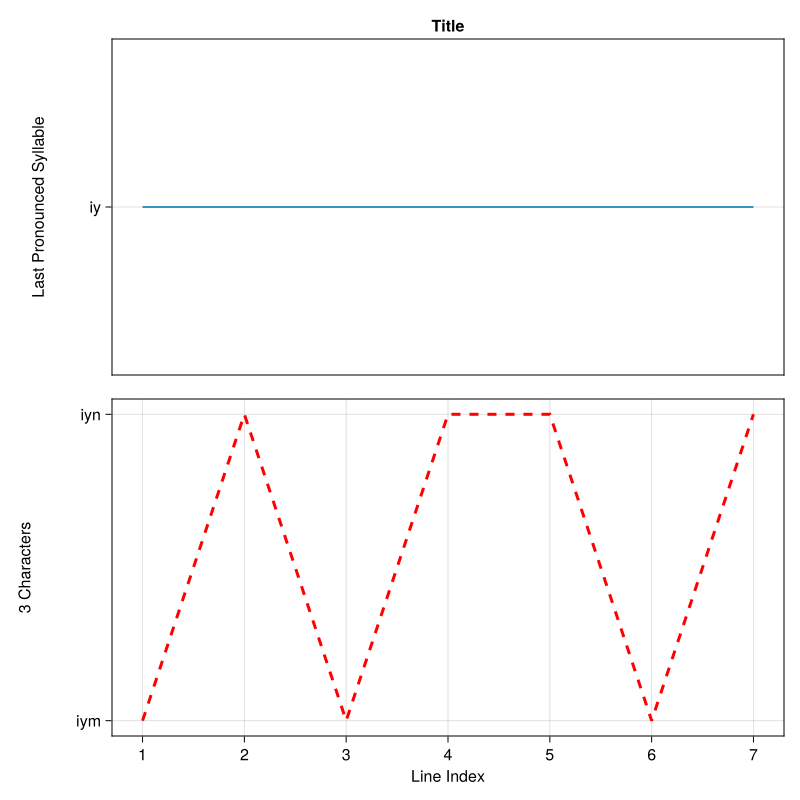
Extracting Syllable Information
You can also extract syllable information without creating a visualization:
# Extract last syllables directly
lr = LastRecited(C)

for (i, text) in enumerate(alfatihah_bw)
    syllables = last_syllable(lr, text)
    println("Verse $i:")
    println("  Core syllable: ", syllables[1].syllable.text)
    println("  + trailing: ", syllables[2].syllable.text)
    println("  Leading + trailing: ", syllables[3].syllable.text)
end
Verse 1:
Core syllable: iy
+ trailing: iym
Leading + trailing: Hiym
Verse 2:
Core syllable: iy
+ trailing: iyn
Leading + trailing: miyn
Verse 3:
Core syllable: iy
+ trailing: iym
Leading + trailing: Hiym
Verse 4:
Core syllable: iy
+ trailing: iyn
Leading + trailing: ~iyn
Verse 5:
Core syllable: iy
+ trailing: iyn
Leading + trailing: Eiyn
Verse 6:
Core syllable: iy
+ trailing: iym
Leading + trailing: qiym
Verse 7:
Core syllable: iy
+ trailing: iyn
Leading + trailing: ~iynConverting Syllables to Numeric Positions
The to_numbers function converts syllables to numeric positions for plotting:
# Collect syllables from all verses
syllables = [last_syllable(LastRecited(A), text)[1] for text in alfatihah_bw]

# Convert to numeric positions
positions, mapping = to_numbers(syllables)

println("Positions: ", positions)
println("\nSyllable mapping:")
for (syll, pos) in mapping
    println("  Position $pos: ", syll.syllable.text)
end
Positions: [1, 1, 1, 1, 1, 1, 1]
Syllable mapping:
Position 1: iyPractical Applications
1. Studying Rhyme Consistency
Check if a poem maintains consistent rhyme:
# Analyze first 10 lines
sample_lines = poem_bw[1:min(10, length(poem_bw))]
vis_rhyme = RhythmicVis(LastRecited(A))
fig_rhyme, data_rhyme = vis_rhyme(sample_lines)

positions, _ = data_rhyme[1]
is_consistent = all(p == positions[1] for p in positions)

println("Rhyme consistency: ", is_consistent ? "Consistent" : "Varies")
fig_rhyme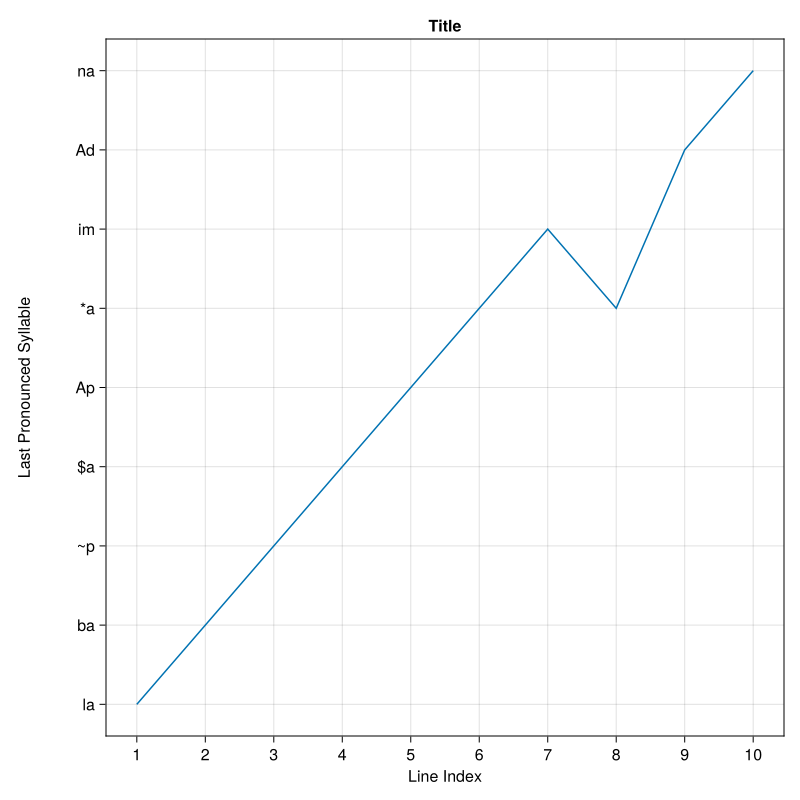
2. Comparing Different Texts
Compare rhyme patterns between different surahs or poems:
# Create two different visualizations for comparison
using CairoMakie

# Al-Fatihah
vis1 = RhythmicVis(LastRecited(B))
fig1, _ = vis1(alfatihah_bw, color=:blue)

# You can create similar visualization for another surah
# and compare the patterns side by side
(Scene (800px, 800px):
0 Plots
2 Child Scenes:
├ Scene (800px, 800px)
└ Scene (800px, 800px), (([1, 1, 1, 1, 1, 1, 1], Dict{LastRecitedSyllable, Int64}(LastRecitedSyllable(Bw("iy")) => 1)), ([1, 2, 1, 2, 2, 1, 2], Dict{LastRecitedSyllable, Int64}(LastRecitedSyllable(Bw("iyn")) => 2, LastRecitedSyllable(Bw("iym")) => 1))))3. Statistical Analysis
Extract statistics about syllable distribution:
# Analyze syllable variety in Al-Fatihah
lr_analysis = LastRecited(C)
all_syllables = [last_syllable(lr_analysis, text) for text in alfatihah_bw]

# Count unique patterns at each level
level1_unique = length(unique([s[1] for s in all_syllables]))
level2_unique = length(unique([s[2] for s in all_syllables]))
level3_unique = length(unique([s[3] for s in all_syllables]))

println("Statistical Analysis:")
println("  Total verses: ", length(alfatihah_bw))
println("  Unique syllables (core): ", level1_unique)
println("  Unique syllables (+ trailing): ", level2_unique)
println("  Unique syllables (full): ", level3_unique)
Statistical Analysis:
Total verses: 7
Unique syllables (core): 1
Unique syllables (+ trailing): 2
Unique syllables (full): 5Advanced Usage: Custom Default Parameters
When creating visualizations, you can set custom defaults:
# Create visualization with default constructor
vis_default = RhythmicVis(LastRecited())  # Uses variant A by default

# Create with explicit variant
vis_explicit = RhythmicVis(LastRecited(B))RhythmicVis{LastRecited}(LastRecited(B))Understanding the Output
The visualization system returns:
- Figure: A Makie figure object that can be displayed, saved, or further customized
- Data: A tuple containing:
- Positions: Integer array indicating which unique syllable each text uses
- Mapping: Dictionary mapping each unique syllable to its numeric position
This data structure allows you to:
- Recreate visualizations with custom styling
- Perform statistical analysis
- Export data for use in other tools
Tips and Best Practices
- Use Variant A for quick overview of basic rhyme patterns
- Use Variant B when you need to distinguish similar-sounding endings
- Use Variant C for comprehensive phonetic analysis
- Customize colors to distinguish between different texts or sections
- Save figures using
save("output.png", fig)for documentation
Working with Large Texts
For analyzing entire surahs or long poems:
# Process in batches if needed
function analyze_batches(texts, batch_size=50)
    results = []
    for i in 1:batch_size:length(texts)
        batch = texts[i:min(i+batch_size-1, length(texts))]
        vis = RhythmicVis(LastRecited(A))
        fig, data = vis(batch)
        push!(results, (fig, data))
    end
    return results
end

# Example: analyze in batches
# batches = analyze_batches(long_text_array)
analyze_batches (generic function with 2 methods)Joseph Schillinger's Rhythmic Graph
Joseph Schillinger's rhythmic graph theory provides a powerful framework for analyzing and visualizing rhythmic patterns in Arabic text, particularly for Quranic recitation (tajweed). This approach maps vowel patterns to rhythmic states with specific durations, creating a quantitative representation of rhythmic flow.
Understanding Rhythmic States
In Schillinger's theory, each vowel pattern maps to a rhythmic state with a duration value. For Arabic/Buckwalter text, we typically distinguish between:
- Short vowels (duration = 1): kasra
i, fathaa, dammau, and tanweenF,N,K - Long vowels (duration = 2): kasra+yaa
iy, fatha+alifaA, damma+wawuw, and alif khanjariyaa` - Maddah (duration = 4 or more): elongated vowel
^
Setting Up the Timing Dictionary
The first step is to create a timing dictionary that maps Buckwalter vowel patterns to rhythmic states:
using Yunir
using CairoMakie

# Define tajweed timings based on Quranic recitation rules
tajweed_timings = Dict{Bw,RState}(
    # Short vowels (1 beat)
    Bw("i") => RState(1, "short"),    # kasra
    Bw("a") => RState(1, "short"),    # fatha
    Bw("u") => RState(1, "short"),    # damma
    Bw("F") => RState(1, "short"),    # fatha tanween
    Bw("N") => RState(1, "short"),    # damma tanween
    Bw("K") => RState(1, "short"),    # kasra tanween

    # Long vowels (2 beats)
    Bw("iy") => RState(2, "long"),    # kasra + yaa
    Bw("aA") => RState(2, "long"),    # fatha + alif
    Bw("uw") => RState(2, "long"),    # damma + waw
    Bw("a`") => RState(2, "long"),    # fatha + alif khanjariya

    # Maddah (4 beats or more)
    Bw("^") => RState(4, "maddah")    # maddah elongation
)
Dict{Bw, RState} with 11 entries:
Bw("a`") => RState(2, "long")
Bw("uw") => RState(2, "long")
Bw("a") => RState(1, "short")
Bw("iy") => RState(2, "long")
Bw("aA") => RState(2, "long")
Bw("N") => RState(1, "short")
Bw("^") => RState(4, "maddah")
Bw("u") => RState(1, "short")
Bw("K") => RState(1, "short")
Bw("F") => RState(1, "short")
Bw("i") => RState(1, "short")The RState structure takes two parameters:
state::Int: The duration/timing valuedescription::String: A descriptive label
Creating a Schillinger Analyzer
Once you have defined your timing dictionary, create a Schillinger object:
schillinger = Schillinger(tajweed_timings)Schillinger(Dict{Bw, RState}(Bw("a`") => RState(2, "long"), Bw("uw") => RState(2, "long"), Bw("a") => RState(1, "short"), Bw("iy") => RState(2, "long"), Bw("aA") => RState(2, "long"), Bw("N") => RState(1, "short"), Bw("^") => RState(4, "maddah"), Bw("u") => RState(1, "short"), Bw("K") => RState(1, "short"), Bw("F") => RState(1, "short")…))Analyzing Text with rhythmic_states
The rhythmic_states function analyzes Buckwalter-encoded Arabic texts and converts them into rhythmic states. Let's analyze verses from Al-Fatihah:
# Define Al-Fatihah in Buckwalter encoding
bw_texts = [
    Bw("bisomi {ll~ahi {lr~aHoma`ni {lr~aHiymi"),
    Bw("{loHamodu lil~ahi rab~i {loEa`lamiyna"),
    Bw("{lr~aHoma`ni {lr~aHiymi"),
    Bw("ma`liki yawomi {ld~iyni"),
    Bw("<iy~aAka naEobudu wa<iy~aAka nasotaEiynu"),
    Bw("{hodinaA {lS~ira`Ta {lomusotaqiyma"),
    Bw("Sira`Ta {l~a*iyna >anoEamota Ealayohimo gayori {lomagoDuwbi Ealayohimo walaA {lD~aA^l~iyna")
]

# Analyze the rhythmic patterns
states = rhythmic_states(schillinger, bw_texts)

# Display information about the first verse
println("First verse: $(bw_texts[1].text)")
println("Number of rhythmic states: $(length(states[1]))")
println("First few states:")
for (i, state) in enumerate(states[1][1:min(5, length(states[1]))])
    println("  State $i: duration=$(state.state), type=$(state.label)")
end
[ Info: bisomi
[ Info: {ll~ahi
[ Info: {lr~aHoma`ni
[ Info: {lr~aHiymi
[ Info: {loHamodu
[ Info: lil~ahi
[ Info: rab~i
[ Info: {loEa`lamiyna
[ Info: {lr~aHoma`ni
[ Info: {lr~aHiymi
[ Info: ma`liki
[ Info: yawomi
[ Info: {ld~iyni
[ Info: <iy~aAka
[ Info: naEobudu
[ Info: wa<iy~aAka
[ Info: nasotaEiynu
[ Info: {hodinaA
[ Info: {lS~ira`Ta
[ Info: {lomusotaqiyma
[ Info: Sira`Ta
[ Info: {l~a*iyna
[ Info: >anoEamota
[ Info: Ealayohimo
[ Info: gayori
[ Info: {lomagoDuwbi
[ Info: Ealayohimo
[ Info: walaA
[ Info: {lD~aA^l~iyna
First verse: bisomi {ll~ahi {lr~aHoma`ni {lr~aHiymi
Number of rhythmic states: 9
First few states:
State 1: duration=1, type=short
State 2: duration=1, type=short
State 3: duration=1, type=short
State 4: duration=1, type=short
State 5: duration=1, type=shortThe rhythmic_states function:
- Splits each text into individual words
- Applies syllabification to each word with appropriate boundary conditions:
- First word:
first_word=true, silent_last_vowel=false - Last word:
first_word=false, silent_last_vowel=true - Middle words:
first_word=false, silent_last_vowel=false
- First word:
- Extracts vowel patterns from each syllable
- Maps each vowel pattern to its corresponding rhythmic state using the timing dictionary
Visualizing Rhythmic Patterns
The vis function creates a staircase plot visualization of the rhythmic patterns:
# Create visualization
fig = vis(states, Figure(size=(900, 900)),
         "Al-Fatihah Rhythmic Analysis",
         "Time in Beats",
         "Verse")

fig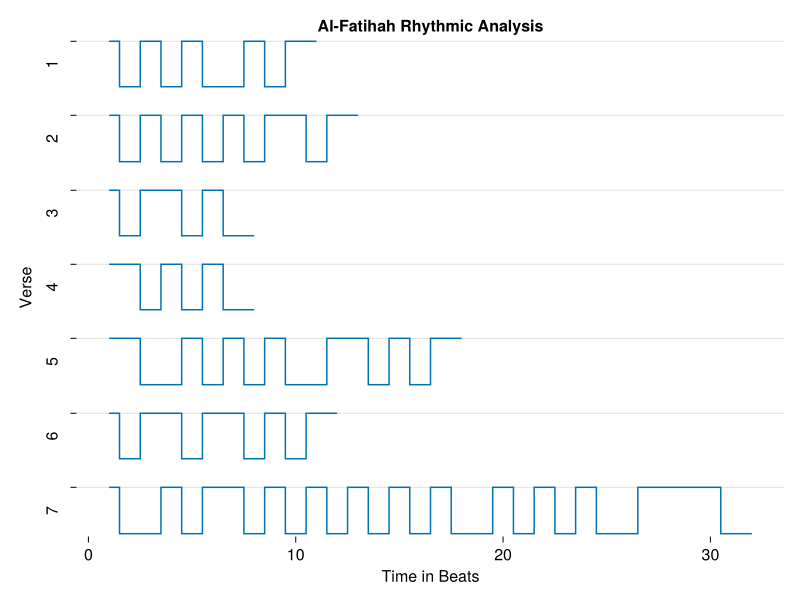
The visualization parameters:
rhythms::Vector{Vector{RState}}: The output fromrhythmic_statesfig::Makie.Figure: Optional pre-existing Figure (defaults to new Figure(size=(900,900)))title::String: Plot title (defaults to "Title")xlabel::String: X-axis label (defaults to "Time in Seconds")ylabel::String: Y-axis label (defaults to "Line")
The staircase plot shows:
- Each subplot represents one text/verse
- Steps alternate between levels (0 and 1) to show rhythmic transitions
- Step width corresponds to the duration of each rhythmic state
- All subplots share the same x-axis for easy comparison
Analyzing Specific Verses
You can analyze specific verses or subsets of text:
# Analyze only the 4th verse
verse4 = rhythmic_states(schillinger, bw_texts[4:4])

println("Verse 4: $(bw_texts[4].text)")
println("Total beats: $(sum(s.state for s in verse4[1]))")
println("Number of states: $(length(verse4[1]))")

# Create visualization for just this verse
fig_verse4 = vis(verse4, Figure(size=(600, 300)),
                 "Verse 4 Analysis",
                 "Time in Beats",
                 "")

fig_verse4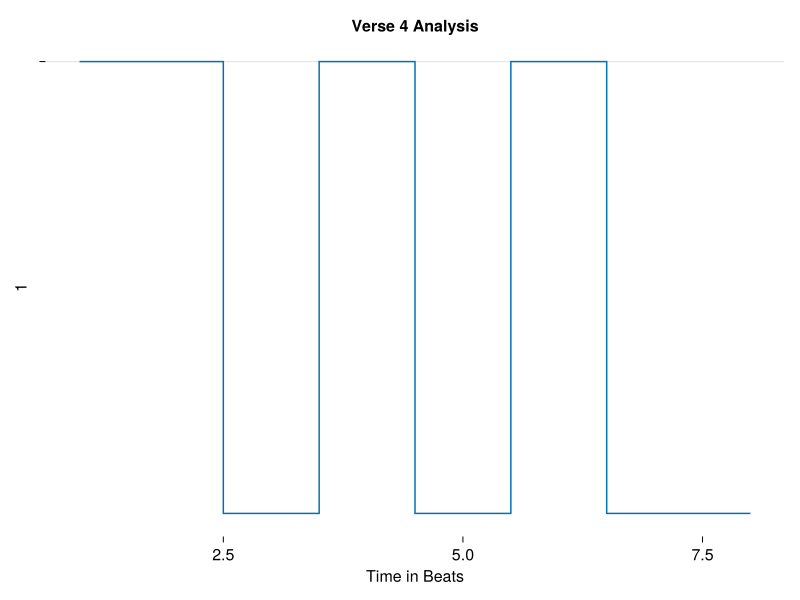
Comparing Rhythmic Patterns
You can compare rhythmic patterns across different verses:
# Analyze verses 1-3
first_three = rhythmic_states(schillinger, bw_texts[1:3])

# Calculate total duration for each verse
for (i, verse_states) in enumerate(first_three)
    total_duration = sum(s.state for s in verse_states)
    short_count = count(s -> s.label == "short", verse_states)
    long_count = count(s -> s.label == "long", verse_states)
    maddah_count = count(s -> s.label == "maddah", verse_states)

    println("Verse $i:")
    println("  Total duration: $total_duration beats")
    println("  Short vowels: $short_count")
    println("  Long vowels: $long_count")
    println("  Maddah: $maddah_count")
end

# Visualize comparison
fig_compare = vis(first_three, Figure(size=(900, 600)),
                  "First Three Verses Comparison",
                  "Time in Beats",
                  "Verse")

fig_compare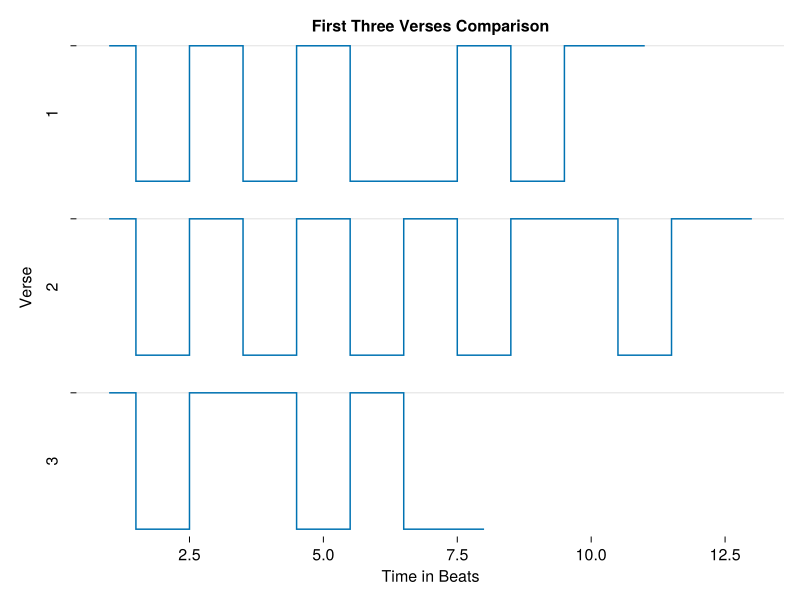
Custom Timing Schemes
You can define custom timing schemes for different recitation styles or analytical purposes:
# Example: Simplified timing (only short vs long)
simple_timings = Dict{Bw,RState}(
    Bw("i") => RState(1, "short"),
    Bw("a") => RState(1, "short"),
    Bw("u") => RState(1, "short"),
    Bw("F") => RState(1, "short"),
    Bw("N") => RState(1, "short"),
    Bw("K") => RState(1, "short"),
    Bw("iy") => RState(2, "long"),
    Bw("aA") => RState(2, "long"),
    Bw("uw") => RState(2, "long"),
    Bw("a`") => RState(2, "long"),
    Bw("^") => RState(2, "long")  # Treat maddah as regular long
)

schillinger_simple = Schillinger(simple_timings)
states_simple = rhythmic_states(schillinger_simple, bw_texts[1:3])

fig_simple = vis(states_simple, Figure(size=(900, 600)),
                "Simplified Timing Analysis",
                "Time in Beats",
                "Verse")

fig_simple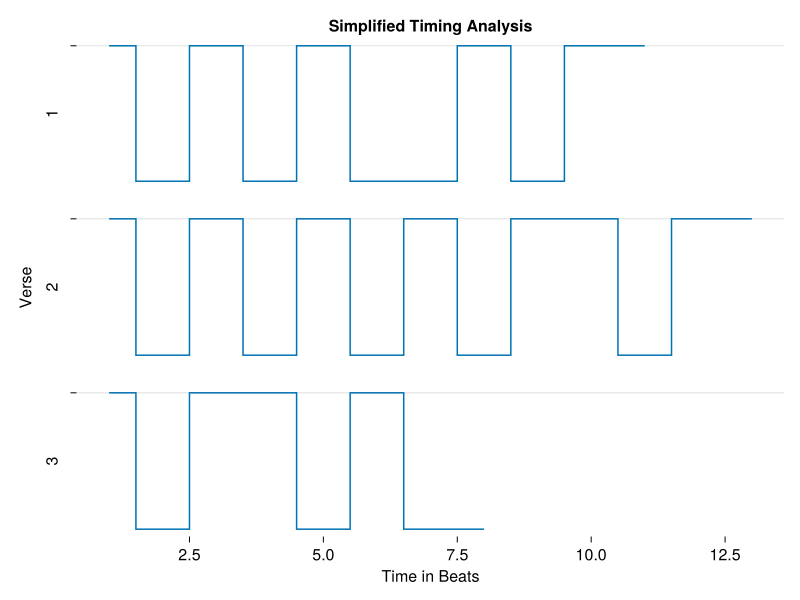
Working with Arabic Script
The rhythmic_states function also accepts Arabic (Ar) text, automatically converting it to Buckwalter encoding:
# Define texts in Arabic script
ar_texts = [
    Ar("بِسْمِ اللَّهِ الرَّحْمَٰنِ الرَّحِيمِ"),
    Ar("الْحَمْدُ لِلَّهِ رَبِّ الْعَالَمِينَ")
]

# Analyze directly
states_ar = rhythmic_states(schillinger, ar_texts)

println("Analyzed $(length(states_ar)) verses from Arabic text")
[ Info: بِسْمِ
[ Info: اللَّهِ
[ Info: الرَّحْمَٰنِ
[ Info: الرَّحِيمِ
[ Info: الْحَمْدُ
[ Info: لِلَّهِ
[ Info: رَبِّ
[ Info: الْعَالَمِينَ
Analyzed 2 verses from Arabic textPractical Applications
1. Recitation Timing Analysis
Calculate total recitation time for verses:
# Assuming 1 beat = 0.3 seconds in typical recitation
beat_duration = 0.3

all_states = rhythmic_states(schillinger, bw_texts)

println("Estimated recitation times:")
for (i, verse_states) in enumerate(all_states)
    total_beats = sum(s.state for s in verse_states)
    time_seconds = total_beats * beat_duration
    println("  Verse $i: $(total_beats) beats ≈ $(round(time_seconds, digits=1))s")
end
[ Info: bisomi
[ Info: {ll~ahi
[ Info: {lr~aHoma`ni
[ Info: {lr~aHiymi
[ Info: {loHamodu
[ Info: lil~ahi
[ Info: rab~i
[ Info: {loEa`lamiyna
[ Info: {lr~aHoma`ni
[ Info: {lr~aHiymi
[ Info: ma`liki
[ Info: yawomi
[ Info: {ld~iyni
[ Info: <iy~aAka
[ Info: naEobudu
[ Info: wa<iy~aAka
[ Info: nasotaEiynu
[ Info: {hodinaA
[ Info: {lS~ira`Ta
[ Info: {lomusotaqiyma
[ Info: Sira`Ta
[ Info: {l~a*iyna
[ Info: >anoEamota
[ Info: Ealayohimo
[ Info: gayori
[ Info: {lomagoDuwbi
[ Info: Ealayohimo
[ Info: walaA
[ Info: {lD~aA^l~iyna
Estimated recitation times:
Verse 1: 11 beats ≈ 3.3s
Verse 2: 13 beats ≈ 3.9s
Verse 3: 8 beats ≈ 2.4s
Verse 4: 8 beats ≈ 2.4s
Verse 5: 18 beats ≈ 5.4s
Verse 6: 12 beats ≈ 3.6s
Verse 7: 32 beats ≈ 9.6s2. Rhythmic Complexity Analysis
Identify verses with the most complex rhythmic patterns:
complexity_scores = []

for (i, verse_states) in enumerate(all_states)
    # Count transitions between different rhythmic states
    transitions = 0
    for j in 1:length(verse_states)-1
        if verse_states[j].state != verse_states[j+1].state
            transitions += 1
        end
    end

    push!(complexity_scores, (i, transitions, length(verse_states)))
    println("Verse $i: $transitions transitions, $(length(verse_states)) total states")
end
Verse 1: 3 transitions, 9 total states
Verse 2: 3 transitions, 11 total states
Verse 3: 3 transitions, 6 total states
Verse 4: 2 transitions, 6 total states
Verse 5: 4 transitions, 13 total states
Verse 6: 5 transitions, 9 total states
Verse 7: 9 transitions, 24 total states3. Finding Rhythmic Patterns
Identify repeated rhythmic sequences:
# Extract rhythmic signature (sequence of durations)
for (i, verse_states) in enumerate(all_states[1:3])
    signature = [s.state for s in verse_states]
    println("Verse $i signature: $(signature[1:min(10, length(signature))])...")
end
Verse 1 signature: [1, 1, 1, 1, 1, 2, 1, 1, 2]...
Verse 2 signature: [1, 1, 1, 1, 1, 1, 1, 1, 2, 1]...
Verse 3 signature: [1, 1, 2, 1, 1, 2]...Important Notes
- Input text must be fully diacritized (include all vowel markings)
- Incomplete diacritization will result in missing rhythmic states
- The syllabification algorithm relies on vowel markers to identify syllable boundaries
- Ensure your timing dictionary includes all vowel patterns present in your text
- If a vowel pattern is missing from the dictionary, a
KeyErrorwill be raised - The standard tajweed timing dictionary covers most Quranic texts
- For large texts, consider analyzing in batches
- The visualization becomes cluttered with many verses; consider splitting into smaller groups
- Each subplot is linked on the x-axis for easy comparison
Complete Example: Full Analysis Pipeline
Here's a complete example analyzing Al-Fatihah:
# 1. Set up timing dictionary
tajweed = Dict{Bw,RState}(
    Bw("i") => RState(1, "short"), Bw("a") => RState(1, "short"),
    Bw("u") => RState(1, "short"), Bw("F") => RState(1, "short"),
    Bw("N") => RState(1, "short"), Bw("K") => RState(1, "short"),
    Bw("iy") => RState(2, "long"), Bw("aA") => RState(2, "long"),
    Bw("uw") => RState(2, "long"), Bw("a`") => RState(2, "long"),
    Bw("^") => RState(4, "maddah")
)

# 2. Create analyzer
analyzer = Schillinger(tajweed)

# 3. Prepare texts (Al-Fatihah)
fatihah = [
    Bw("bisomi {ll~ahi {lr~aHoma`ni {lr~aHiymi"),
    Bw("{loHamodu lil~ahi rab~i {loEa`lamiyna"),
    Bw("{lr~aHoma`ni {lr~aHiymi"),
    Bw("ma`liki yawomi {ld~iyni"),
    Bw("<iy~aAka naEobudu wa<iy~aAka nasotaEiynu"),
    Bw("{hodinaA {lS~ira`Ta {lomusotaqiyma"),
    Bw("Sira`Ta {l~a*iyna >anoEamota Ealayohimo gayori {lomagoDuwbi Ealayohimo walaA {lD~aA^l~iyna")
]

# 4. Analyze rhythmic patterns
rhythms = rhythmic_states(analyzer, fatihah)

# 5. Generate statistics
println("Al-Fatihah Rhythmic Analysis")
println("="^40)
for (i, r) in enumerate(rhythms)
    beats = sum(s.state for s in r)
    println("Verse $i: $(beats) beats, $(length(r)) states")
end

# 6. Create visualization
final_fig = vis(rhythms, Figure(size=(1000, 1000)),
               "Al-Fatihah - Complete Rhythmic Analysis",
               "Time (Beats)",
               "Verse Number")

final_fig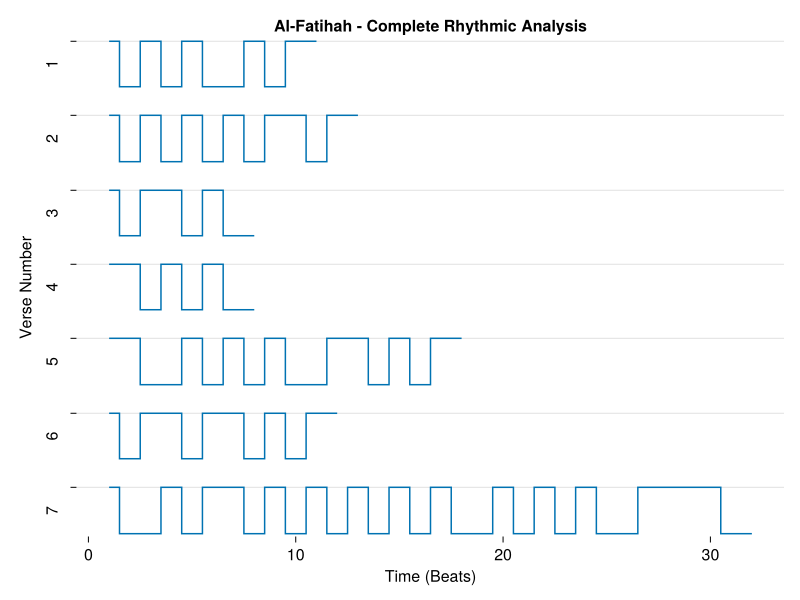
References
- [1]
- A.-A. B. Asaad. Text Analytics of the Qur'ān. Master's thesis, University of the Philippines (06 2025).